10-Marble
November 20, 2023
Solved

Move Excel VBA feature to end of model tree

  • November 20, 2023
  • 1 reply
  • 2268 views

Hello community,

Is it possible to move a feature (feature) to any position in the model tree using Excel VBA?

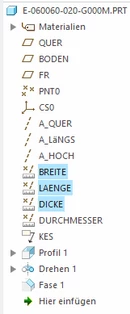
E.g. the feature "Width" "Length" "Thickness" at the end of the model tree.

What would be the procedure here with Creo 5.0?


Translated by the Community Moderation using Google Translate
-----------------------------------------------------------------------------------------------


Hallo Community,

ist es mit Excel VBA möglich, ein Feature (KE) an eine beliebige Position im Modellbaum zu verschieben ?

Z.b. das Feature "Breite" "Laenge" "Dicke" an das Ende des Modellbaum.

Wie wäre hier die Vorgehensweise mit Creo 5.0 ?


HaGs_0-1700487331027.png


Best answer by HaGs

Hi YaroslavSin,

Thank you very much for the example, that was exactly what helped me a lot.

I always looked in the “Features” chapter but couldn’t find “GetFeatureByName()”.

Now I will try how I can find the last feature in the model tree.

I also noticed that there can't be a space in the "name".

GetFeatureByName("Fase 1")
"Chamfer 1" is not found because it contains a space.


gSession.SetConfigOption("regen_failure_handling", "resolve_mode")
Set solidModel = gSession.CurrentModel
Set feat = solidModel.GetFeatureByName("length")
Set aktFeat = solidModel.GetFeatureByName("profil3")
Set reorderOperations = New CpfcFeatureOperations

Set afterFeatOps = feat.CreateReorderAfterOp(aktFeat)
Call reorderOperations.Append(afterFeatOps)
Call solidModel.ExecuteFeatureOps(reorderOperations, Nothing)
Call solidModel.Regenerate(Nothing)
Set gOWindow = gSession.CurrentWindow
goWindow.Activate
goWindow.Repaint
goWindow.Refresh
Call gSession.SetConfigOption("regen_failure_handling", "no_resolve_mode")


Translated by the Community Moderation using Google Translate
-----------------------------------------------------------------------------------------------

Hi  @YaroslavSin

vielen Dank für das Beispiel, genau das hat mir sehr geholfen.

Ich hab immer im Kapitel "Features" gesucht, aber kein "GetFeatureByName()" gefunden.

Nun werden ich versuchen, wie ich das letzte Feature im Modellbaum finden kann.

Habe auch festgestellt, dass im "namen" kein Leerzeichen sein darf.

GetFeatureByName("Fase 1")

"Fase 1" wird nicht gefunden, weil ein Leerzeichen enthalten ist.


gSession.SetConfigOption("regen_failure_handling", "resolve_mode")
Set solidModel = gSession.CurrentModel
Set feat = solidModel.GetFeatureByName("laenge")
Set aktFeat = solidModel.GetFeatureByName("profil3")
Set reorderOperations = New CpfcFeatureOperations

Set afterFeatOps = feat.CreateReorderAfterOp(aktFeat)
Call reorderOperations.Append(afterFeatOps)
Call solidModel.ExecuteFeatureOps(reorderOperations, Nothing)
Call solidModel.Regenerate(Nothing)
Set gOWindow = gSession.CurrentWindow
gOWindow.Activate
gOWindow.Repaint
gOWindow.Refresh
Call gSession.SetConfigOption("regen_failure_handling", "no_resolve_mode")

1 reply

17-Peridot
November 21, 2023

Hello!

I think, not possible to reorder features using VBA API.

But...

You can write a mapkey:

1. Find features by search tool by a name or ID

2. Select founded features

3. Place selected features to the footer


Run this mapkey from VBA

17-Peridot
November 23, 2023

You can use this functions to reorder a feature

IpfcFeature.CreateReorderBeforeOp
IpfcFeature.CreateReorderAfterOp


HaGs10-MarbleAuthor
10-Marble
November 23, 2023

Hi YaroslavSin,

Thank you very much for your interest and your suggestions.

I have to test the mapkey to see whether “Moving to the End” works.


The possibility of:

IpfcFeature.CreateReorderBeforeOp
IpfcFeature.CreateReorderAfterOp


I've tried it before but failed, you might have. an example ?

And how can I find the feature e.g. "width" in the model tree, in VBA?


Translated by the Community Moderation using Google Translate
-----------------------------------------------------------------------------------------------

Hi  YaroslavSin,

vielen Dank für dein Interesse und deine Vorschläge.

Das mit dem Mapkey muss ich mal testen, ob das mit dem "Verschieben an das Ende" funktioniert.


Die Möglichkeit von

IpfcFeature.CreateReorderBeforeOp
IpfcFeature.CreateReorderAfterOp

 hab ich schon mal probiert bin aber gescheitert, hättest du vlt. ein Beispiel ?

Und wie kann ich das Feature z.B. "Breite" im Modellbaum finden, in VBA ?