17-Peridot
July 21, 2020
Solved

Pro/PROGRAM Graphical Editor

  • July 21, 2020
  • 2 replies
  • 4505 views

Repost from Part Modeling...


Just wanted to let you all know... the latest release of Nitro-PROGRAM has a NO HASSLE - FREE LICENSE option...


If you have ever struggled with seemingly never ending edit-import-fix-import-fix-import cycle of creating or editing Pro/PROGRAMs for Creo Parametric Parts or Assemblies... -OR- nearly screamed while trying to edit a Pro/PROGRAM that someone else created....


Then Nitro-PROGRAM is something you should download immediately and use!


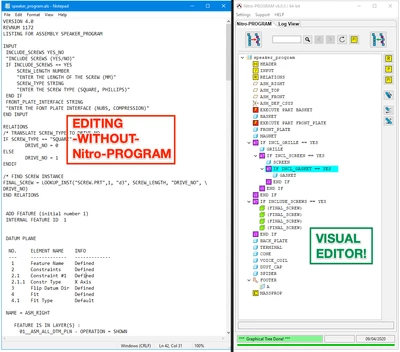
Nitro-PROGRAM eliminates the pains and frustrations of the "text editor" and transforms the creating, editing and testing of Pro/PROGRAMs into a visual, drag-and-drop, editing love-fest by comparison.  😉
 

2020-07-21 at 9.52 AM.png


Nitro-PROGRAM saves time, reduces frustration, improves accuracy and enables you to think about the most important elements of Creo Parametric Automation -- data-flow and regeneration!


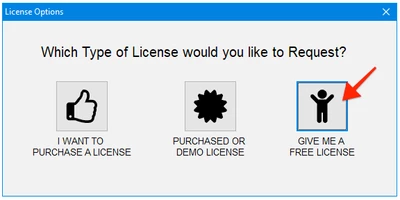
Simply Download, Unzip, Run.... and request a FREE License... NO REGISTRATION REQUIRED!
 

2020-07-21 at 10.02 AM.png

Nitro-PROGRAM does require JLINK to be installed with Creo Parametric.  (instructions here if you need them)

The only difference between FREE and a Purchased License is the amount of content you can import changes for.


Most companies, the FREE License will be extremely useful.


Enjoy!


Dave

Best answer by HamsterNL

From my own experience (testing Nitro-PROGRAM):


You can open any part/assembly which contain PRO/Program. Nitro-PROGRAM will display your PRO/Program nicely is its graphical editor. There's no limit in "extracting" the PRO/Program from your model into Nitro-PROGRAM.


The free version is limited on the number of IF statements it can import back into your model.


The current limit is only 5 IF statements for the free version (but IF statements in the Relations do not count to this limit).


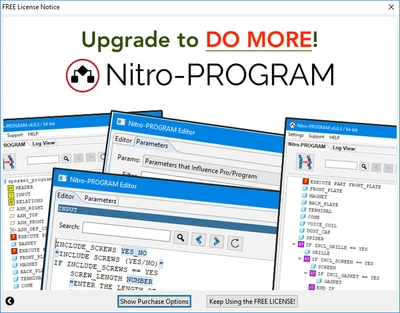
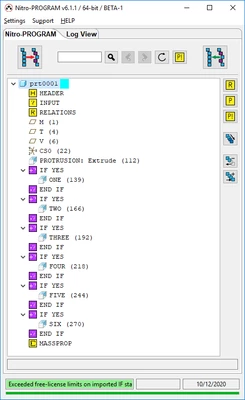
If you hit the limit, the free version of Nitro-PROGRAM will simply not import the (modified) PRO/Program back into the model. It will show a splashscreen (see below) and a message "Exceeded free-license limits on imported IF statements" in the Log View of Nitro-PROGRAM.


HamsterNL_0-1598625880666.png


HamsterNL_1-1598625981729.png


2 replies

17-Peridot
August 5, 2020

Hello, @DavidBigelow 

Thanks for sharing!


Please, check UTF support. Feature names in the tree and relations.

ysinitsyn_0-1596602470141.png


17-Peridot
August 5, 2020

Language?!


can you send a model to test?!


dave

17-Peridot
August 5, 2020

Language: Russian


24-Ruby III
August 27, 2020

Hi,


please can you reveal the exact limits implemented in the FREE version ?


My questions follow:

1.] How many features can a part have?

2.] How many features+components can an assembly have?

3.] What happens when the limit is exceeded?


HamsterNL18-OpalAnswer
18-Opal
August 28, 2020

From my own experience (testing Nitro-PROGRAM):


You can open any part/assembly which contain PRO/Program. Nitro-PROGRAM will display your PRO/Program nicely is its graphical editor. There's no limit in "extracting" the PRO/Program from your model into Nitro-PROGRAM.


The free version is limited on the number of IF statements it can import back into your model.


The current limit is only 5 IF statements for the free version (but IF statements in the Relations do not count to this limit).


If you hit the limit, the free version of Nitro-PROGRAM will simply not import the (modified) PRO/Program back into the model. It will show a splashscreen (see below) and a message "Exceeded free-license limits on imported IF statements" in the Log View of Nitro-PROGRAM.


HamsterNL_0-1598625880666.png


HamsterNL_1-1598625981729.png


24-Ruby III
August 30, 2020

@HamsterNL wrote:

From my own experience (testing Nitro-PROGRAM):


You can open any part/assembly which contain PRO/Program. Nitro-PROGRAM will display your PRO/Program nicely is its graphical editor. There's no limit in "extracting" the PRO/Program from your model into Nitro-PROGRAM.


The free version is limited on the number of IF statements it can import back into your model.


The current limit is only 5 IF statements for the free version (but IF statements in the Relations do not count to this limit).


If you hit the limit, the free version of Nitro-PROGRAM will simply not import the (modified) PRO/Program back into the model. It will show a splashscreen (see below) and a message "Exceeded free-license limits on imported IF statements" in the Log View of Nitro-PROGRAM.


HamsterNL_0-1598625880666.png


HamsterNL_1-1598625981729.png


@DavidBigelow ,

please can you confirm this "definition" of limited functionality for Nitro-PROGRAM application using FREE license ?

... AND ... please can you add "definition" of limited functionality for Nitro-BOM application using FREE license (in separate discussion) ?