
1-Visitor
May 21, 2013
Question

Pro/toolkit error startup of application failed

  • May 21, 2013
  • 2 replies
  • 10562 views

Hello,

I am developping a bit with Pro/Toolkit. First I did my application as spawn mode (exe) as they advice us. I have no problem with that, I compile it and register it and then it works fine in ProE 64 bits. Then I decided to do the same application but as DLL mode in order to have my application running faster but I can't get it to work :

non pb with compilation , then I register it like this :

name ProEConnectorDLL

startup dll

exec_file C:\Devel\ProEConnectorDLL\x64\Debug\ProEConnectorDLL.dll

text_dir C:\Devel\ProEConnectorDLL\text

delay_start TRUE

allow_stop TRUE

REVISION 18

end

then I launch it thanks to Tools/Auxiliary Application but when I start it I get the error message : startup_failed.JPG
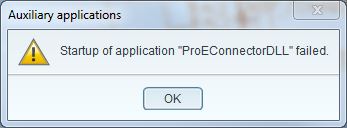
Please help!

Thank you


This thread is inactive and closed by the PTC Community Management Team. If you would like to provide a reply and re-open this thread, please notify the moderator and reference the thread. You may also use "Start a topic" button to ask a new question. Please be sure to include what version of the PTC product you are using so another community member knowledgeable about your version may be able to assist.

2 replies

1-Visitor
May 22, 2013

Hi,

Did you check the trail file after the application run?.

Can you send what your userinitalize looks like.

Regards

Anika Kapoor

Emilie1-VisitorAuthor
1-Visitor
May 23, 2013

Hello!

Sorry if my question seems simple but where can I find the tail file?

Here is my userinitializee :

extern "C" int user_initialize()

{

ProError err = PRO_TK_NO_ERROR;

ProMode mode = PRO_MODE_UNUSED;

err = ProModeCurrentGet(&mode);

if(err == PRO_TK_NO_ERROR)

{

if(mode == PRO_TK_BAD_CONTEXT)

{

printf("ProModeCurrentGet error in user_initialize.\n");

}

}

return(0);

}

Thank you

1-Visitor
May 23, 2013

Hello,

I don't think trail file will help a lot... Generaly there is only a line with the same message than the error dialog...

First of all, you must check if the protk.dat paths are good in Help->System Informations->Auxiliary application Information.

If everything is OK, check if all dependancies of your dll is in the same directory.

BR,

Etienne

Emilie1-VisitorAuthor
1-Visitor
May 23, 2013

I checked the path from the protk.dat and they are good. I renamed the dat file protk_dll.dat, I guess it's not a problem.

I checked the dependencies and they are all in the same directory...

Do you have a small example project ofr example? I am using Visual Studio 2008 Express. Maybe it's something in the configuration of my project, if I could compare with a working .sln it could be very helpful

Thank you a lot!

1-Visitor
May 23, 2013

Try with filename protk.dat instead of protk_dll.dat