14-Alexandrite
November 30, 2021
Question

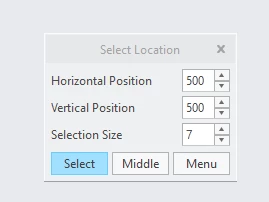
Selection location box on startup

  • November 30, 2021
  • 3 replies
  • 2858 views

Any ideas how to disable this please


RH_10122575_1-1638266379667.png


3 replies

24-Ruby III
December 1, 2021

What do you mean? Do you want to set the position to (0,0)?

14-Alexandrite
December 1, 2021

I don't know what it is. I would prefer it not to show on launch of creo.

24-Ruby III
December 1, 2021

Hi,

rename all config.pro files to config.pro_renamed and start Creo.

14-Alexandrite
December 1, 2021

how does renaming my config file fix this please.


24-Ruby III
December 1, 2021

@RH_10122575 wrote:

how does renaming my config file fix this please.


Hi,

if you use Creo Parametric then renaming config.pro will tell you whether the problem is "hidden" inside config.pro.

18-Opal
December 1, 2021

The last place for check are you environment vars, maybe there is a different between the default ones, open cmd shell and enter set, or the ones in Creo, open a system window and enter set as well.


Check for proTk.dat and creoTk.dat as well, because your hitachi env is not the default one 🙂