
5-Regular Member
December 8, 2021
Solved

Set a different font size for tables and dimensions

  • December 8, 2021
  • 2 replies
  • 2301 views

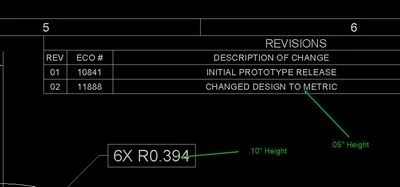
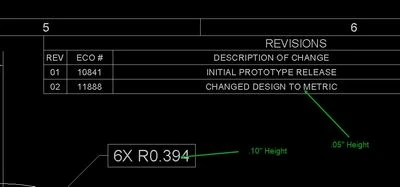
Is it possible to add a config option to the prodetail.dtl file that will allow me to specify a different font size for tables compared to the default font size for dimensions?  We use a revision table to track changes and I want that font size to be smaller than the font size of our dimensions.
2021-12-08_09-57-36.jpg

Best answer by MartinHanak

@zyoder-2 wrote:

Is it possible to add a config option to the prodetail.dtl file that will allow me to specify a different font size for tables compared to the default font size for dimensions?  We use a revision table to track changes and I want that font size to be smaller than the font size of our dimensions.

2021-12-08_09-57-36.jpg


Hi,

  • unfortunately such detail option is not available
  • also table implementation is poor ... table is not able to remember text height (for example)


2 replies

zyoder-25-Regular MemberAuthor
5-Regular Member
December 8, 2021

For more clarification, when someone adds a new row to the revision table, it automatically is assigned the default font size for the dimensions (.10") and we want any new rows added to be assigned the smaller font size (.05") without having to add the row, enter your text, and then manually change the font size.

24-Ruby III
December 9, 2021

@zyoder-2 wrote:

Is it possible to add a config option to the prodetail.dtl file that will allow me to specify a different font size for tables compared to the default font size for dimensions?  We use a revision table to track changes and I want that font size to be smaller than the font size of our dimensions.

2021-12-08_09-57-36.jpg


Hi,

  • unfortunately such detail option is not available
  • also table implementation is poor ... table is not able to remember text height (for example)


18-Opal
December 12, 2021

In my humble opinion, all functions related to text, including tables are “Stone Age”, no change in the interface since years, hard to select the right things, …


 BTW: I don,t believe that company will use 3D drawings in near future, maybe I’m wrong here. But for that reason I don’t understand such a buggy interface as a front end. But the code is old and don’t touch it😀


I would like to see a drawing sheet as one PowerPoint Slide (Canvas), with a lot of parametric features, but I guess this will never happen. Maybe other CAD systems will do that.