
16-Pearl
January 11, 2022
Solved

setting web_link_security_autoprompt in config.pro

  • January 11, 2022
  • 2 replies
  • 2735 views

Hi there,


I am trying to get rid of security warnings within Creo's own chromium browser, when visiting Web.Link enabled Websites (e.g. Windchill).
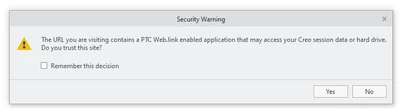
Mat_0-1641905696549.png


Activating "remember my decision" only works until Creo or chromium is restarted.


I tried


web_link_security_autoprompt no


but it does not seem to have an effect on that.


Any suggestions?


Best answer by sjuraj

From weblink guide (Creo 7):


New Security Warning While Using Chromium
Browser
A new security warning message is added for the Chromium browser. Every time
the Chromium browser loads a web page that tries to access Web.Link methods
and objects, the warning message appears. You are prompted to confirm if you
want to access the Web.Link application from the web page.


So you can check Remebmber decision. If this windows will appear anywat try to check Remember decition and then create new customizacion.ui file to load at the start of Creo.

2 replies

24-Ruby III
January 11, 2022

Hi,

please ask PTC Support.

24-Ruby III
January 11, 2022
sjuraj15-MoonstoneAnswer
15-Moonstone
January 12, 2022

From weblink guide (Creo 7):


New Security Warning While Using Chromium
Browser
A new security warning message is added for the Chromium browser. Every time
the Chromium browser loads a web page that tries to access Web.Link methods
and objects, the warning message appears. You are prompted to confirm if you
want to access the Web.Link application from the web page.


So you can check Remebmber decision. If this windows will appear anywat try to check Remember decition and then create new customizacion.ui file to load at the start of Creo.

Mat16-PearlAuthor
16-Pearl
January 17, 2022

unfortunately, that did it.

I am not a big fan of PTC's policy to throw more and more of Creo's configuration into a binary creo_parametric_customization.ui file.

e.g. If You, as an administrator, want to roll out changes to the appearance (e.g. model tree columns), this seems no longer possible without overwriting the user's own configuration (e.g. customized button layout), which is also stored in creo_parametric_customization.ui.


Or is there a way to "merge" two creo_parametric_customization.ui files?


15-Moonstone
January 17, 2022

it is possible https://www.ptc.com/en/support/article/CS54928

but it depends on how you distribute changes across users