1-Visitor
April 17, 2019
Solved

Toolkit move from VS2010 (Creo2) to VS2015 (Creo4)

  • April 17, 2019
  • 1 reply
  • 3807 views

Hi,

I am trying to figure out what the problem is with my Toolkit. I have a toolkit (DLL) that I compiled using VS2010 and it works fine.

Now I am trying to do some modification to it and compile it for Creo4. In the mean time change computer, so no more VS2010 installed.

I get this message:
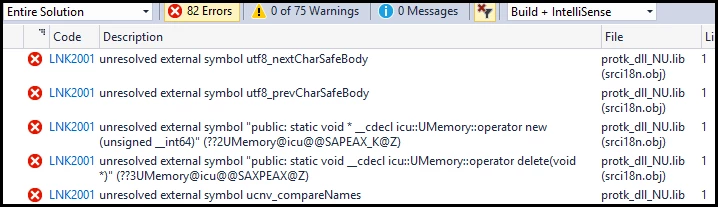
image.png


Anyone can give me a hint on how to fix this?

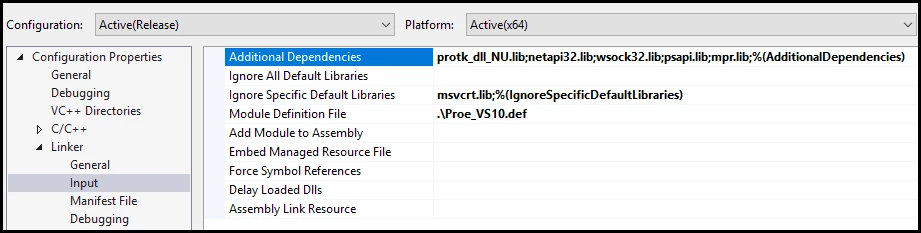
Here's some settings:
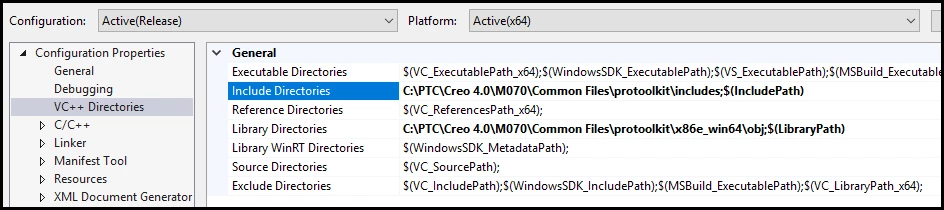
image.pngimage.png

The only change from my previous compile, id the Creo path change from Creo 2 to Creo4, and also the "protk_dll_NU.lib" was "protk_dll.lib".


Thanks

Best answer by GabrielZaha

According to the user guide Appendix E it looks like you need to add ucore.lib and udata.lib to the library list.

The files are located on the same directory as protk_dll_NU.lib

1 reply

14-Alexandrite
April 17, 2019

According to the user guide Appendix E it looks like you need to add ucore.lib and udata.lib to the library list.

The files are located on the same directory as protk_dll_NU.lib

AlexCote1-VisitorAuthor
1-Visitor
April 17, 2019

Thanks GabrielZaha, it did solve the issue. Never caught that detail !!