

Question
toolkitribbonui.rbn is not created
Hi All,
I am facing problem to creating "toolkitribbonui.rbn" file Using VB API.
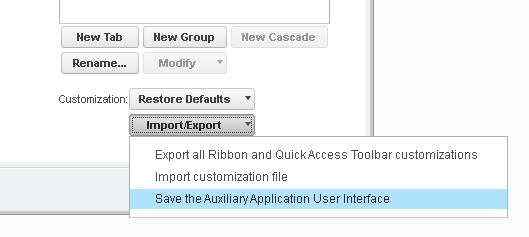
After Clicking on this item "toolkitribbonui.rbn" is not geting created to my working directory or any where?
Please guide me whether i have to do any more stetting for that?
Note:- Using VB API i have added command and manually created ribbon tab and assign command to the buttun.
Now i want to save and load while new session started.
This thread is inactive and closed by the PTC Community Management Team. If you would like to provide a reply and re-open this thread, please notify the moderator and reference the thread. You may also use "Start a topic" button to ask a new question. Please be sure to include what version of the PTC product you are using so another community member knowledgeable about your version may be able to assist.