
1-Visitor
April 17, 2020
Solved

understanding a mapkey

  • April 17, 2020
  • 2 replies
  • 6191 views

Hello,

I have a question about mapkeys. Is there any possibility to see what exactly does a mapkey do?

I work with mapkeys, which have been created by either CAD engineers or former collegues and I would like to understand exact procedure of the mapkeys (in general).

The simplier ones can be understood from the config file but not the more complicated ones.

I hope I made the question understandable, thanks for any answer.
 

Best answer by Trebla

Hi Vojtaa,


You could use, for a moment, these 2 config options in your config.pro:


set_trail_single_step yes

visible_mapkeys yes


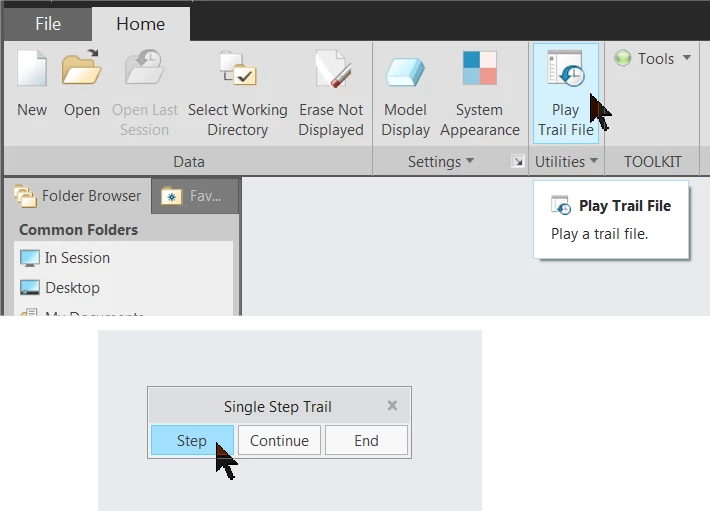
Open Creo, then run the mapkey you want to explore. Close Creo, look for your last Trail file and  copy it to the Desktop or where you want, open Creo, execute your Desktop Trail file (trail.txt), and you will see step by step, with pauses,  what that mapkey did.


trail.png


2 replies

23-Emerald III
April 17, 2020

What are you trying to do with the mapkeys?

The best way to learn what is in one is to record one and then look at the resulting file.

I do know they are not easy to edit, except in certain areas of the structure.

They are like a snapshot of the trail file. Recording what you do for a short period of time.

Overall, I am not a fan of mapkeys as the user does not learn the system if they do too much with the mapkeys.

Where I do use mapkeys is for very repetitive things that the user must do. Adding corporate parameters to a file is one, recalculating the weight when mass properties change, etc.


KenFarley
21-Topaz II
April 17, 2020

I seem to recall there was a setting or some such that made the mapkey text saved much less "bloated" that was the default. Is that something we currently have to set or am I remembering something from the long ago?

I checked my config.pro and don't see anything, but I might have forgot to save the setting...

Chris3
21-Topaz I
April 17, 2020

You are referring to:

cmdmgr_trail_output yes


There are a bunch of tips over here if you are not that familiar with them:

https://community.ptc.com/t5/System-Administration/Mapkey-Writing-Editing-Tips/td-p/443729

24-Ruby III
April 19, 2020

@Vojtaa wrote:

Hello,

I have a question about mapkeys. Is there any possibility to see what exactly does a mapkey do?

I work with mapkeys, which have been created by either CAD engineers or former collegues and I would like to understand exact procedure of the mapkeys (in general).

The simplier ones can be understood from the config file but not the more complicated ones.

I hope I made the question understandable, thanks for any answer.


Hi,

there is no easy way to determine the function of a mapkey. If the macro creator has not added descriptive text, then it's probably better to delete the mapkey.

You can split mapkey into several parts - semicolon characters is located at the end of mapkey "building block" and then run these new mapkeys sequentially one by one.

Vojtaa1-VisitorAuthor
1-Visitor
April 20, 2020

Hi Martin, its not that I don't know what the specific mapkey does. The problem is that I don't know how does it do.

An example - the is a mapkey "dtl" which loads the company dimension style to the drawing with different one. I know what does it do, but I would like to learn the way how to do it without a mapkey. Therefore it would be helpful to see this directly from the mapkey.

It's just an example, no need to explain this specific "dtl" case.

Trebla16-PearlAnswer
16-Pearl
April 30, 2020

Hi Vojtaa,


You could use, for a moment, these 2 config options in your config.pro:


set_trail_single_step yes

visible_mapkeys yes


Open Creo, then run the mapkey you want to explore. Close Creo, look for your last Trail file and  copy it to the Desktop or where you want, open Creo, execute your Desktop Trail file (trail.txt), and you will see step by step, with pauses,  what that mapkey did.


trail.png