10-Marble
May 12, 2023
Solved

Using Single Key Shortcuts in Creo 7.0

  • May 12, 2023
  • 4 replies
  • 4723 views

Hi all,


So I was looking to start customizing my workflow so I can make parts and drawings quicker. One way I wanted to do that was to start customizing my keyboard shortcuts. I am noticing in Creo Parametric 7.0 that you can't have any keyboard shortcuts that are single keyed or are a combination of a key and Shift?


With all of the different tools in Creo that I could use shortcuts for, this seems arbitrarily limiting.


I do have the option "enable_single_char_keybrd_short" enabled, but whenever I try to make a shortcut with a single key or a key+Shift I get the message "Invalid shortcut. Please use another key combination."


So can you just not use single key shortcuts? What's the point of that config option?


Any help is appreciated! Thank you



Best answer by tbraxton

Yes, you can use mapkeys to execute feature creation (i.e. extrude). You can also record the shortcuts within a mapkey.


If you have not seen the built in shortcuts, here is a list.

Article - CS311988 - List of default shortcuts in Creo Parametric (ptc.com)


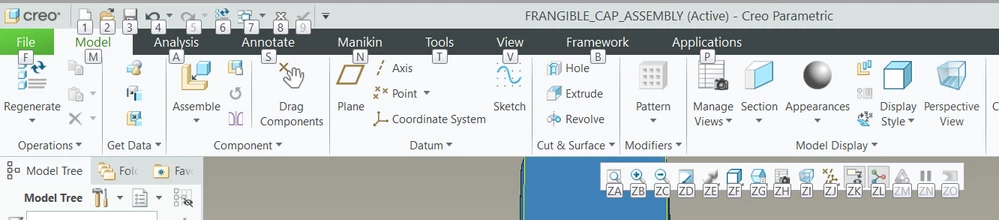
The ribbon is mapped extensively to keystrokes already. If you press the ALT key it will display the mnemonics for ribbon commands that are available by default. You can use these shortcuts when recording mapkeys. See the labels below (assembly mode).


For example, in part mode: Extrude using keyboard shortcuts is invoked using ALT->m->x  .


tbraxton_0-1683906621450.png


4 replies

24-Ruby III
May 12, 2023

Hi,

I have never used shortcut. I prefer using mapkeys.

Regarding shortcuts, I recommend contacting PTC Support.

10-Marble
May 12, 2023

Can you set Mapkeys to simple things like "Extrude" or "Revolve"? That might be a better option than using the bugged shortcut UI

tbraxton
22-Sapphire II
tbraxton22-Sapphire IIAnswer
22-Sapphire II
May 12, 2023

Yes, you can use mapkeys to execute feature creation (i.e. extrude). You can also record the shortcuts within a mapkey.


If you have not seen the built in shortcuts, here is a list.

Article - CS311988 - List of default shortcuts in Creo Parametric (ptc.com)


The ribbon is mapped extensively to keystrokes already. If you press the ALT key it will display the mnemonics for ribbon commands that are available by default. You can use these shortcuts when recording mapkeys. See the labels below (assembly mode).


For example, in part mode: Extrude using keyboard shortcuts is invoked using ALT->m->x  .


tbraxton_0-1683906621450.png


KenFarley
21-Topaz II
May 12, 2023

My guess, because I too never use shortcuts, is that the only "available" single character shortcuts would be ones that are not currently used by elements of Creo's ribbon?

A reason I've heard that single key shortcuts are problematic is because they will prevent you from ever using shortcuts that start with that same letter. Using "O" to open a file? Okay, but now you can't use "oa", "ob", "oxx" etc. because the interface will jump to your "o" shortcut before you can get to any of the other letters in your other shortcuts.

10-Marble
May 12, 2023

I've heard that as well, but I feel like I should still have the option to use single key shortcuts for certain keys right? Also you can't set shortcuts to have multiple keys. I'd have to make mapkeys of basic commands, which I'm considering doing

tbraxton
22-Sapphire II
22-Sapphire II
May 12, 2023

Shortcuts have had issues with how they work when customizing the UI. The UI presents misleading information when the config option is set. This is an example that has been fixed supposedly. Depending on what release you are in it could be relevant. Take a look at this an let us know if it applies to you.


Article - CS324989 - Shift+N is shown as the Shorcut key to view normal even after the config option enable_single_char_keybrd_short is set to no in Creo Parametric (ptc.com)

10-Marble
May 12, 2023

Thanks for the reply. Article isn't really relevant since I can't even set that command's shortcut to be Shift-N, whether the config option is set or not. My specific version is 7.0.2.0 if that helps

Dale_Rosema
23-Emerald III
23-Emerald III
May 12, 2023

I usually go in and turn off the shortcut keys so that they don't interfere with the mapkeys.

Remember that single key shortcuts take away that letter from mapkeys.

Mapkeys / shortcuts are activated after that key or series of keys has been pressed.


If you do "S" for save, you cannot have S### or any double, triple combination thereof.

Dale_Rosema
23-Emerald III
23-Emerald III
May 12, 2023

Click on "File", then "Options" and this menu pops up.

Click on "Quick Access Toolbar" and as you scroll, you can see any Shortcut that are put there by PTC.


Dale_Rosema_0-1683907066089.png