
10-Marble
October 25, 2022
Solved

VB API - Line does not appear at correct place

  • October 25, 2022
  • 1 reply
  • 4311 views

When drawing a simple line using the sample VB API code, a line appears in the drawing but the wrong place consistently.


Using the code below, a line is expected from 0,0 to 20,0


Dim start As IpfcPoint3D
Dim finish As IpfcPoint3D

model = creoSession.CurrentModel


start = New CpfcPoint3D
start.Set(0, 0)
start.Set(1, 0)
start.Set(2, 0)


finish = New CpfcPoint3D
finish.Set(0, 20)
finish.Set(1, 20)
finish.Set(2, 0)


geom = (New CCpfcLineDescriptor).Create(start, finish)
lineInstructions = (New CCpfcDetailEntityInstructions).Create(geom, Nothing)
drawing.CreateDetailItem(lineInstructions)


When I check the coordinates again, they show correct values.


MessageBox.Show("Start = " & start.Item(0).ToString & " x " & start.Item(1).ToString & vbCrLf &
"End = " & finish.Item(0).ToString & " x " & finish.Item(1).ToString
)
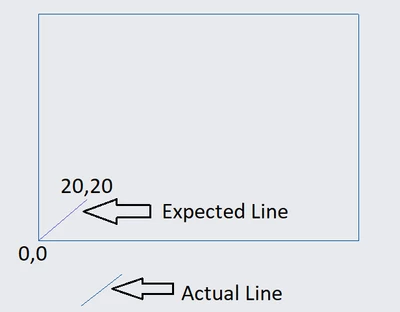
 

TusharSuradkar_0-1666699974003.png


Am I missing any transformation?


Best answer by TusharS

Thank you for the reply @YaroslavSin and my sincere apologies for the delay.

The hint is helpful, but it will be immensely helpful if you could also point to how the online/offline help could be accessed and any code snippet for the transformation of screen coordinates to drawing coordinates.

I have tried this meanwhile:


' define line start and end point
Dim startPt As IpfcPoint3D
Dim endPt As IpfcPoint3D

startPt = New CpfcPoint3D
startPt.Set(0, 0)
startPt.Set(1, 0)
startPt.Set(2, 0)

endPt = New CpfcPoint3D
endPt.Set(0, 20)
endPt.Set(1, 20)
endPt.Set(2, 0)

Dim scrTrans As IpfcScreenTransform = (New CCpfcScreenTransform).Create(startPt, endPt, Nothing)


Can you please tell, with code, how to transform these points to drawing coordinates.


Thanks, in advance.


Best,

Tushar


1 reply

12-Amethyst
April 14, 2023

Did you find solution for this?


Regards,

Prasad

10-Marble
April 14, 2023

Not yet. Still waiting for a solution.

17-Peridot
April 14, 2023

From the documentation:

The VB API methods and properties that manipulate drawings generally use screen coordinates.


You need to transform drawing coordinates to screen coordinates before to put it into a method.