
12-Amethyst
May 18, 2025
Solved

VB api to List feature parameters

  • May 18, 2025
  • 1 reply
  • 1228 views

Hi, 


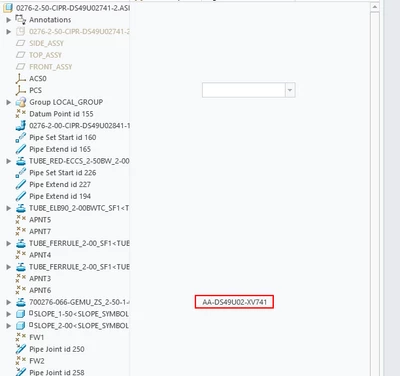
See the picture here. We often have a feature parameter in an assembly. That can avoid assigning different parameter for the same components in different assemblies. 

Very often we need to change the value of this parameter. I am trying to write a vb.net code to automate the process but cannot find the proper interface, method or function to perform this task. 

Can anyone share a hint? Thanks
SC_TK_0-1747533198581.png


Best answer by RPN

Configure the model item, the owner is the model, the type is a FEATURE, the ID is the feature id, that’s it. The rest of the calls are the same. I guess there a couple of examples for VB. BTW, you still have to configure the tree, in C I don’t know any API to configure the tree display columns.

1 reply

RPN
RPN18-OpalAnswer
18-Opal
May 18, 2025

Configure the model item, the owner is the model, the type is a FEATURE, the ID is the feature id, that’s it. The rest of the calls are the same. I guess there a couple of examples for VB. BTW, you still have to configure the tree, in C I don’t know any API to configure the tree display columns.

SC_TK12-AmethystAuthor
12-Amethyst
May 19, 2025

Thanks 17-Peridot,


I follow your comments and successfully extract the data.  

In case someone else has the same question as mine, I attached my code here for the reference. 

Thanks again for 17-Peridot 's help. 

 Try
 ' Connect to Creo session
 Dim session As IpfcBaseSession = asyncConnection.Session
 Dim model As IpfcModel = session.CurrentModel

 ' Ensure model is an assembly
 If model Is Nothing OrElse model.Type <> EpfcModelType.EpfcMDL_ASSEMBLY Then
 Console.WriteLine("Please open an assembly in Creo.")
 Return
 End If

 Dim items As IpfcModelItems = CType(model, IpfcModelItemOwner).ListItems(EpfcModelItemType.EpfcITEM_FEATURE)
 Dim i As Integer
 For i = 0 To items.Count - 1
 Dim itemfeature As IpfcFeature = CType(items(i), IpfcFeature)
 If itemfeature.FeatTypeName = "COMPONENT" Then
 'Console.WriteLine(itemfeature.FeatType & " " & itemfeature.FeatTypeName & " " & items(i).Id)
 Dim featParmOwner As IpfcParameterOwner = CType(itemfeature, IpfcParameterOwner)
 Dim featParms As IpfcParameters = featParmOwner.ListParams
 If Not featParms.Count = 0 Then
 Dim TagParam As IpfcBaseParameter = featParmOwner.GetParam("Tag_Number")
 If TagParam IsNot Nothing Then
 Dim TagParamValue = TagParam.Value
 Console.WriteLine(TagParamValue.StringValue)
 End If
 End If
 'Console.WriteLine(featParms.Count)
 End If
 Next

 Catch ex As Exception
 Console.WriteLine("Error: " & ex.Message)
 End Try