

13-Aquamarine
June 10, 2020
Question

Web.Link demp "Replacing Components" replies BadContext

  • June 10, 2020
  • 4 replies
  • 2815 views

I am trying Web.Link demo program comes with Creo 2 or Creo 5 at

". . . \Common Files\<DateCode>\weblink\weblinkexamples\html\pfcComponentFeatExamples.html"

I have resolved some trivial problems of PTC's demo program (so works fine on Windows 10 with Creo embedded IE browser). The attachment pfcComponentFeatExamples.zip contains all needed files to reproduce the problem. 
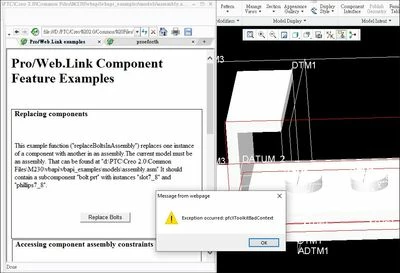
error message bad context.jpg

 The error message is as shown above. I have traced into the source code and I know the error is from this line:


 /*--------------------------------------------------------------------*\ 
 Carry out the replacements
 \*--------------------------------------------------------------------*/ 
 assembly.ExecuteFeatureOps (replaceOps, null);


But what's wrong with the demo program? that is listed below for your convenience 


function replaceBoltsInAssembly ()
{
 // var oldInstance = "PHILLIPS7_8";
 var oldInstance = "BOLT";
 var newInstance = "SLOT7_8";
 
 if (pfcIsMozilla())
 netscape.security.PrivilegeManager.enablePrivilege("UniversalXPConnect");

 /*--------------------------------------------------------------------*\ 
 Get the current assembly 
 \*--------------------------------------------------------------------*/ 
 var session = pfcGetProESession ();
 var assembly = session.CurrentModel;
 
 if (assembly.Type != pfcCreate ("pfcModelType").MDL_ASSEMBLY)
 throw new Error (0, "Current model is not an assembly");
 
 /*--------------------------------------------------------------------*\ 
 Get the new instance model for use in replacement
 \*--------------------------------------------------------------------*/ 
 var bolt = session.GetModel ("BOLT", pfcCreate ("pfcModelType").MDL_PART);
 
 var row = bolt.GetRow (newInstance); 
 
 var newBolt = row.CreateInstance();
 
 var replaceOps = pfcCreate ("pfcFeatureOperations");
 
 /*--------------------------------------------------------------------*\ 
 Visit the assembly components
 \*--------------------------------------------------------------------*/ 				
 var components = assembly.ListFeaturesByType (false,
						pfcCreate ("pfcFeatureType").FEATTYPE_COMPONENT);
 
 for (ii = 0; ii < components.Count; ii++)
 {
 var component = components.Item(ii);
 
 var desc = component.ModelDescr;
 if (desc.InstanceName == oldInstance)
	{
	 var replace = component.CreateReplaceOp (newBolt);
	 
	 replaceOps.Append (replace);
	}
 }
 
 /*--------------------------------------------------------------------*\ 
 Carry out the replacements
 \*--------------------------------------------------------------------*/ 
 assembly.ExecuteFeatureOps (replaceOps, null);
 
 return;
}


4 replies

RPN
18-Opal
June 17, 2020

Maybe it helps to read the comments


#
# Some! notes and assumption for a component interchange
#
# Your current active model is an assembly
# The model name given by CurModel is part of the assembly
# The model name given by NewModel is loaded and already in session
# Note:
# The components are replaced only in the top level 
# of the given assembly (not recursive) 
#
# If the CurModel is an instance or the genric, 
# NewModel must be in the same family table or the generic
# It will Fail if CurModel is equal to RepModel
# If the CurModel is part of an interchange assembyl, 
# NewModel must be in the same interchange assembly
# ID Table Map still valid
# You must have a PTC lizense (AdvAssembly) to do an interchange 
# ... 
#
# A proc just to call our small test function
#
proc ReplaceModelTest {} {

 set Assy [ps_model cur]
 set CurModel PSL053.PRT
 set RepModel PSL060.PRT

 ReplaceModel $Assy $CurModel $RepModel
}

#
# This is the basic task
# More check are required 
# to make it save
# e.g. 
# RepIDs is not initialized
# Component feature status may invalid (suppressed, name retrieve may fail)
# RepModel may not in session
# Is the RepModel valid for Replace (same table, interchange assembly)
# ...
proc ReplaceModel {Assy CurModel RepModel} {

 # Visit by Component will return all 
 # component IDs in the given assembly
 foreach ID [ps_visit type -model $Assy component] {
 # Get the model Name for the given ID in this assembly
 set M [ps_assy comp -model $Assy $ID]
 #If the component name is equal to CurModel add to our list
 if {[string equal -nocase $M $CurModel]} {lappend RepIDs $ID}
 }

 # Do the Interchange
 ps_assy interchange -model $Assy -- $RepIDs $RepModel

 return
}


ReplaceModelTest
16-Pearl
June 18, 2020

hi,


problem is with "regen_failure_handling" option that should be set to "resolve_mode".
If you use Creo 7 - this option is deprecated 😞 https://www.ptc.com/en/support/article/CS260154

Please retry in Creo 4

regards
Krzysztof

RPN
18-Opal
June 18, 2020

Sorry, but I don't get your point. If you do everythink correct, the replace of the instance will not fail.

16-Pearl
June 19, 2020

Sample files:

https://3dprocompl-my.sharepoint.com/:f:/g/personal/kurbaniak_3dprocompl_onmicrosoft_com/EiJwBEK9b2pGhuIhaU5qfzABTuSAWnigof_MYZkURYomzg?e=1axaHu


Please unzip  community.zip file. Start Creo session (unzipped folder setup as working directory)


Having creo 4 and creo 7 please follow:

1) open ASM0001.ASM

2) in embedded browser open <load_point>/weblink/weblinkexamples/html/pfcComponentFeatExamples.html

3) click 'Replace bolt' - nothing has changed

4) import config_2.pro setup file

5) click 'Replace bolt'


look at:

1) https://www.ptc.com/en/support/article/CS181059

2) https://www.ptc.com/en/support/article/CS260154


regards,

12-Amethyst
June 30, 2020
Actually the compact class you constructure was wrong, you need use the method :ExecuteFeatureOps (pfcFeatureOperations Ops,/* optional */ pfcRegenInstructions Instrs) , the feaOpts should be pfcCompModelReplace of which is the child of pfcFeatureOperation to be append to pfcFeatureOperations, that will be true, cause the visiting issue i can't serach the Community, so just send you the method
1-Visitor
April 21, 2021

Dear  @Kittychen,


I use the Weblink automation and I also having this problem with my old customizations. They are not working and the problem is the same as you. 


assembly.ExecuteFeatureOps (replaceOps, null);


the complete code is at weblinkexamples ..installdirectory\PTC\Creo 7.0.3.0\Common Files\weblink\weblinkexamples


Do you resolve the problem? If yes, could you Help me, or someone else?

@RPN @Gucio 


I've tried to understand the deprecated_config_option, but it is very confusing.