
6-Contributor
May 19, 2020
Question

Windows Security Dialog (genlwsc.exe) Opening Behind Active Window

  • May 19, 2020
  • 3 replies
  • 7341 views

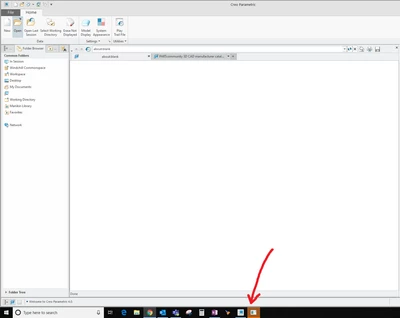
Every time I first get onto the windchill server in Creo and am connected to a Windchill server, the authentication dialog (genlwsc.exe) opens behind the active window as shown with its icon blinking yellow. Any solutions for this???


The current 'solution' https://www.ptc.com/en/support/article/CS303945, is to manually select it which isn't a solution.


Thanks.
Authentification.png


3 replies

23-Emerald III
May 19, 2020

May not be a 'solution' but it is the current workaround.


Some of my users see this and some don't. Just depends on the mood of Windchill. 


If your system is not up-to-date with Windows patches, then we get an EFX open error that totally blocks the Windows Security Dialog window. Have to kill the WIndows Security Dialog box, then OK the EFX error and then Windchill will let you login when you go through the Server Manager Window.

smarcus36-ContributorAuthor
6-Contributor
May 19, 2020

Thanks for the reply. None of the user group gets an explicit error message, just the authentication dialog box opens behind Creo. 

17-Peridot
May 21, 2020

Hello@smarcus3 


Try to change web browser type to other, by set config.pro option windows_browser_type

smarcus36-ContributorAuthor
6-Contributor
May 21, 2020

I like the idea; however, Chromium's authentication window also appears behind Creo 


17-Peridot
May 21, 2020

What Creo version and browser type you using?

13-Aquamarine
October 18, 2022

I see the resolutions are still being evaluated by PTC. Have you been able to learn anything more about this in the last 2 years?