1-Visitor
Apr 4, 2017 12:37 PM UTC
Solved

working directory on startup?

Hello,

I would like to startup CP 3.0/4.0 and automatically be in a specific working directory drive instead of C:\Prostart (We currently do not use a PDM server). I can't find any setting in my config that drives the current location to C:\Prostart.

Does anyone know of a setting in config that will allow this?  Just FYI, I know that you can set it manually by right-clicking.

Thank you!

TomU
TomUAnswer
23-Emerald IV
Apr 4, 2017 12:54 PM UTC

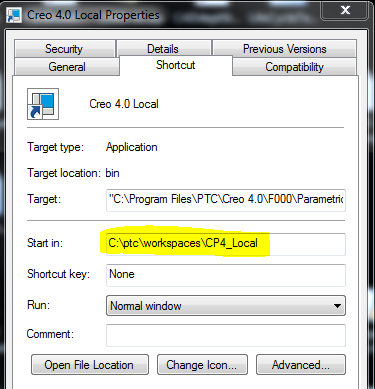
Your initial working directory is based on your start in location.  This can be controlled by the shortcut used to start or it can be manually set by a .bat file.

If you want to force Creo to always open files from a particular location, take a look at the config option file_open_default_folder.

1 reply

TomU
TomU23-Emerald IVAnswer
23-Emerald IV
Apr 4, 2017 12:54 PM UTC

Your initial working directory is based on your start in location.  This can be controlled by the shortcut used to start or it can be manually set by a .bat file.

If you want to force Creo to always open files from a particular location, take a look at the config option file_open_default_folder.

Translate