

1-Visitor
May 25, 2014
Question

what can I do to creating model name one by one at the project subassemblies in afx/equipments

  • May 25, 2014
  • 1 reply
  • 5143 views

Hi,

AFX should be establish the project name and support the named parts/assemblies one by one

but there is a large problem in efx/equipments.
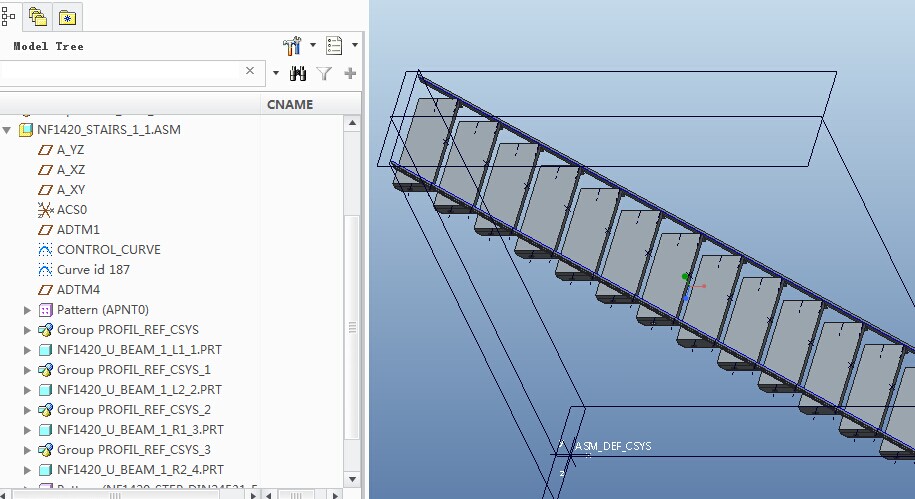
11.jpg

project_name=1420 ,

the named stair assemlby: NF1420_STAIR_1_1

the named stair parts: NF1420_ U_BEAM_1_L1_1 ,and so on;

So I can create the element_name.txt in \efx\parts\equipment\steel_construction_mm\stairs ,

The content :PROJECT_SHORT#_#ELEMENT_NUMBER
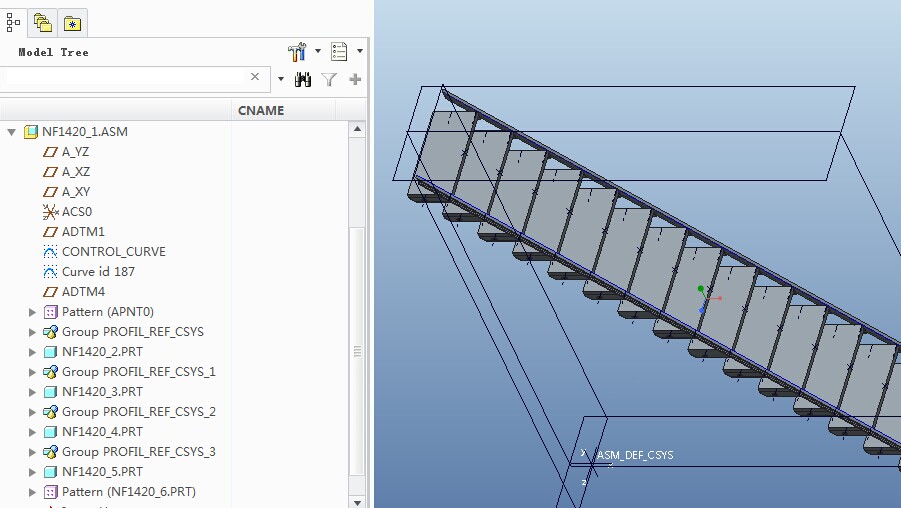
22.jpg

now

project_name=1420 ,

the named stair assemlby: NF1420_1;

the named stair parts: NF1420_ 2;

NF1420_3 ,and so on;

These named parts/assemblies are not my named code;

so I need a named code ,for example:

project_name=1420 ,

the named stair assemlby: NF1420_1;

the named stair parts: NF1420_ 1-1;

NF1420_1-2 ,and so on;

I need help from buw and tell me the named code .

THANKS !

    1 reply

    1-Visitor
    May 26, 2014

    Hello,

    seems the only thing you are missing is to replace the "_" by a "-". If this is correct just replace

    #_# by #-# in file element_name.txt

    Stefan

    1-Visitor
    June 30, 2014

    hello,stefan

    You still haven't answered my question.

    These are correct by used "_"or"-" in file element_name.txt

    there are no problem,look at the picture above.

    how to create the named code one by one in afx/equipments.file ?

    1-Visitor
    June 30, 2014

    Hello,

    you can put

    SUBASSEMBLY_NAME#-#ELEMENT_NUMBER

    into element_name.txt and set option , but then the files will be named like

    NF1420-1-2

    I do not know in what cases you make "-" and in what cases you make "_" between the numbers

    Stefan