

3-Newcomer
November 23, 2023
Solved

Best way to convert .mi file to .dwg

  • November 23, 2023
  • 1 reply
  • 3723 views

Hi, 

We need to convert a large number of old .mi drawings created with Creo Elements/Drafting  18.1.

I done some research i i found 3 ways to do that.


1) Use PTC Creo, open the files and do "save as" and select  .dwg in file format.

2) Install Creo Elements Direct Modeling Express 8.0 and use dxfdwg.exe that is a tool to convert different file type.

3) Reinstall Creo Elements/Drafting 18.1, open the files and do "save as" and select  .dwg in file format.


Of this 3 method there is one that is better in terms of quality(precision, quotas, errors,  missing elements, etc) of the converted file ?

If there are other ways to do that please le me know.

Thanks for the support.


Best Regards 

Giacomo Ceresola
 

Best answer by Kotom-Eng

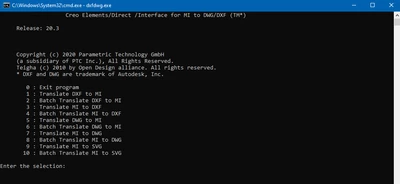
The batch mode is the selection No 8 (for MI to DWG):


KotomEng_0-1700747751920.png


To convert files from different folders, give the full path name of the files, example:

c:\temp\Folder1\File1.mi
"c:\temp\Folder 2\File 2.mi"


If spaces are present, add quotes.


See the translator manual at:

https://support.ptc.com/help/creo/ced_drafting/r20.6.0.0/en/ced_drafting/baggage/dxf.pdf


1 reply

16-Pearl
November 23, 2023

In terms of quality, 2) and 3) are better than 1) because 1) will translate first from MI to Creo, then from Creo to DWG (two translations).


Still in terms of quality, 2) and 3) are exactly the same, since Modeling, Modeling Express and Drafting use the same tool dxfdwg.exe.


In terms of ease of use, 2) is better tahn 3), since there is a batch mode with dxfdwg.exe; All the files can be translate in one shot.


There is not better translator from MI to DWG than dxfdwg.exe.


3-Newcomer
November 23, 2023

Thank you !!!

So dxfdwg.exe has a function to covert a file's batch? I didn't know that.

That function can convert file from different folders (with a common parent folder) or all the file needs to be in the same folder? If it can do that it will be very useful.


Thank you again


Kotom-Eng16-PearlAnswer
16-Pearl
November 23, 2023

The batch mode is the selection No 8 (for MI to DWG):


KotomEng_0-1700747751920.png


To convert files from different folders, give the full path name of the files, example:

c:\temp\Folder1\File1.mi
"c:\temp\Folder 2\File 2.mi"


If spaces are present, add quotes.


See the translator manual at:

https://support.ptc.com/help/creo/ced_drafting/r20.6.0.0/en/ced_drafting/baggage/dxf.pdf