

4-Participant
March 7, 2023
Solved

how Creo Element Drafting OOTB start up works

  • March 7, 2023
  • 1 reply
  • 2276 views

Does anybody knows what are the steps and which files generally Creo Element Drafting follow to start?

Mainly I'm trying to have at the startup of the application the old original Black background in the Me10 style.


Thanks!

Marco
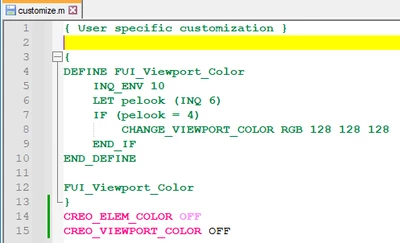


Best answer by Kotom-Eng

KotomEng_0-1678296256721.png


1 reply

16-Pearl
March 7, 2023

If you click on

KotomEng_0-1678200760720.png


you will get this look

KotomEng_2-1678200856721.png


Is this the look that you want?


MarcoLoli4-ParticipantAuthor
4-Participant
March 8, 2023

Kotom,

thank you for your reply.


What I'm looking for the black screen (Cocreate colours).

Unfortunately, I can change the colors to the cocreate style after the start up, but I have to do everytime and the selection is not persistent.


Any clue?


MarcoLoli_0-1678287799966.png


16-Pearl
March 8, 2023

Add


CREO_ELEM_COLOR OFF
CREO_VIEWPORT_COLOR OFF


in the file "customize.m" of the directory "C:\Program Files\PTC\Creo Elements\Direct Drafting 20.xxx" and restart Drafting.