10-Marble
October 24, 2022
Solved

No Diameter symbol when i try to annotate my holes

  • October 24, 2022
  • 2 replies
  • 1746 views

Hello,

Im a solidworks user, but im starting to work with creo elements/direct.

When i try to add a dimension to a hole, the diameter symbol doesn`t show.

Can someone help me?

Thanks 
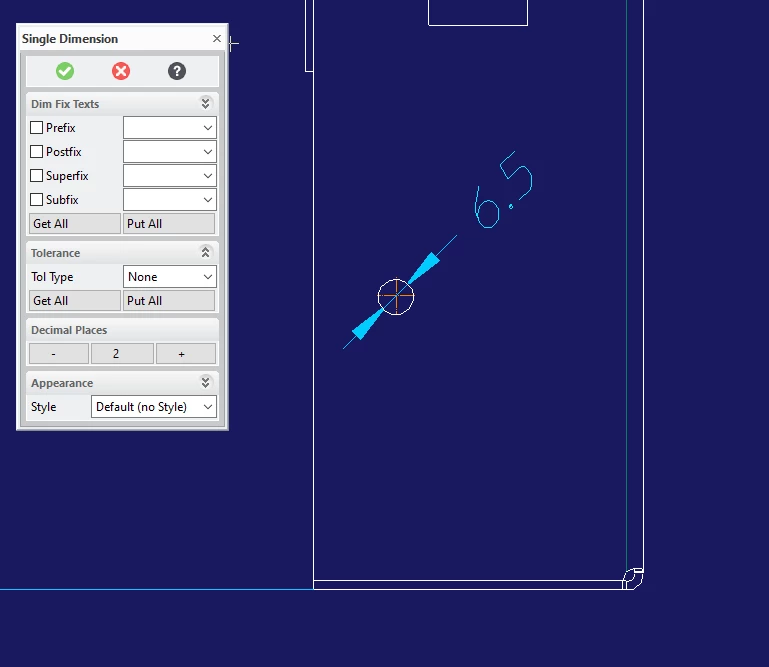
 

Capturar.PNG


Best answer by FriedhelmK

Hello

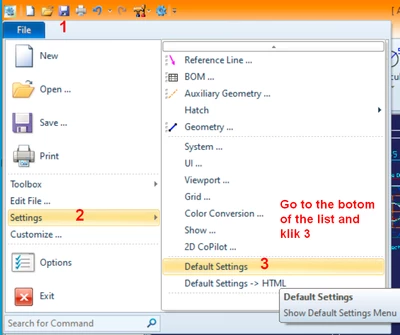
if you want that the diameter or radius dimensions that you place in the future will have the right prefix follow this

FriedhelmK_0-1666899240549.png

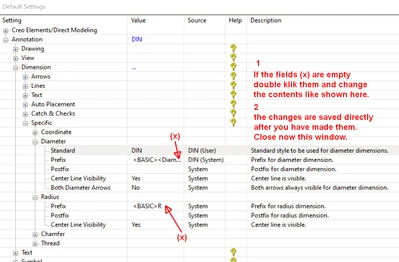
This brings you to:

FriedhelmK_2-1666900234334.png

Now you can try to add a Ø and a radius dimension to a hole.

Hope this helps  Success

2 replies

16-Pearl
October 24, 2022

The dialog on your image "Single Dimension" is for linear dimension.

You should click on "Circular":


KotomEng_0-1666601431213.png


Then click on the word "Prefix":


KotomEng_1-1666601564086.png


You'll get:


KotomEng_3-1666601692733.png


Click on "Spec Chars":


KotomEng_4-1666601744785.png


Click on "Diameter" and "Apply"


KotomEng_5-1666601814462.png


And finally, click on the green arrow.


You can add the symbol on an existing dimension by editing its properties.

17-Peridot
October 27, 2022

Hello

if you want that the diameter or radius dimensions that you place in the future will have the right prefix follow this

FriedhelmK_0-1666899240549.png

This brings you to:

FriedhelmK_2-1666900234334.png

Now you can try to add a Ø and a radius dimension to a hole.

Hope this helps  Success