4-Participant
February 21, 2023
Solved

PTC CREO ELEMENTS ARC LENGTH SYMBOL ADDITION

  • February 21, 2023
  • 1 reply
  • 1859 views

Hi,


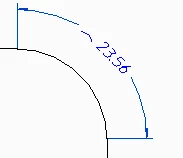
How to add arc length symbol in the drawing as shown in red loop in the attached snap. Please explain step by step. (CREO ELEMENTS)


Regards,

Nidhin


Best answer by Kotom-Eng

Dear Nidhin,


According to ISO 129-1, the arc symbol is not on the value but on the side:
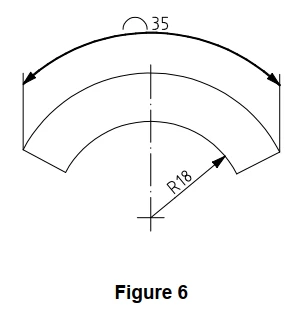
KotomEng_0-1676989834345.png


To add the arc symbol:


Click on "Properties"

KotomEng_1-1676989928662.png


Click on the arc dimension, then on "Fix Text"
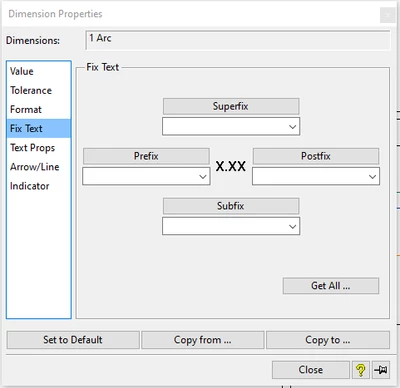
KotomEng_2-1676990028671.png


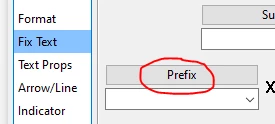
Click on "Prefix"

KotomEng_3-1676990101439.png


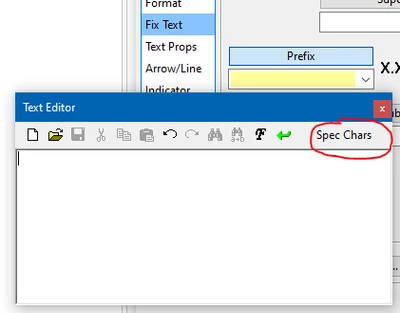
Click on "Spec Chars"

KotomEng_4-1676990174460.png


KotomEng_5-1676990228926.png


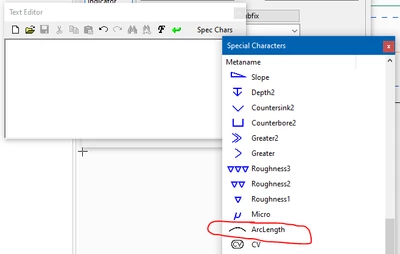
Click on "ArcLength" then on "Apply"
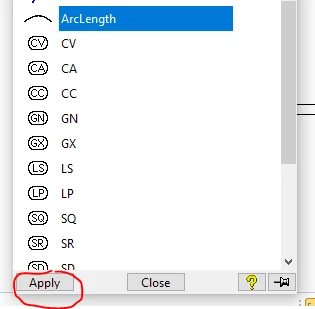
KotomEng_6-1676990305900.png


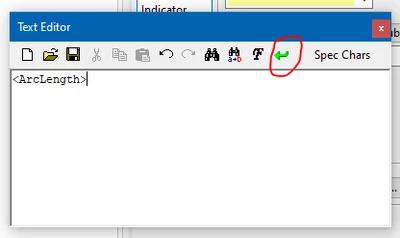
Click on the green arrow

KotomEng_7-1676990352841.png


Done

KotomEng_8-1676990416003.png


1 reply

Kotom-Eng16-PearlAnswer
16-Pearl
February 21, 2023

Dear Nidhin,


According to ISO 129-1, the arc symbol is not on the value but on the side:

KotomEng_0-1676989834345.png


To add the arc symbol:


Click on "Properties"

KotomEng_1-1676989928662.png


Click on the arc dimension, then on "Fix Text"

KotomEng_2-1676990028671.png


Click on "Prefix"

KotomEng_3-1676990101439.png


Click on "Spec Chars"

KotomEng_4-1676990174460.png


KotomEng_5-1676990228926.png


Click on "ArcLength" then on "Apply"

KotomEng_6-1676990305900.png


Click on the green arrow

KotomEng_7-1676990352841.png


Done

KotomEng_8-1676990416003.png