1-Visitor
January 22, 2019
Solved

Save STL not available

  • January 22, 2019
  • 1 reply
  • 2440 views

Hi,


I work with Creo Elements/Direct Modeling 18 on two different machines. One of them lists STL in save>file type while the other does not. The software version is the same, the model I'm working on is loaded from the same pkg. 


Any ideas?


Thanks a lot!
Best answer by ThomasKirkman

The STL Data interface must be turned on.


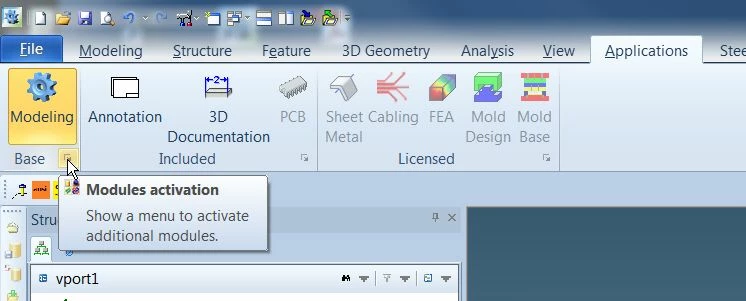
1. From the Applications tab, click on the corner arrow of the Base module.

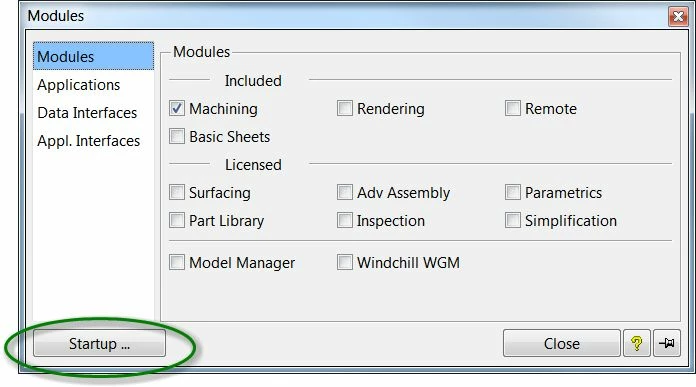
2. From the Modules box, click on Startup.

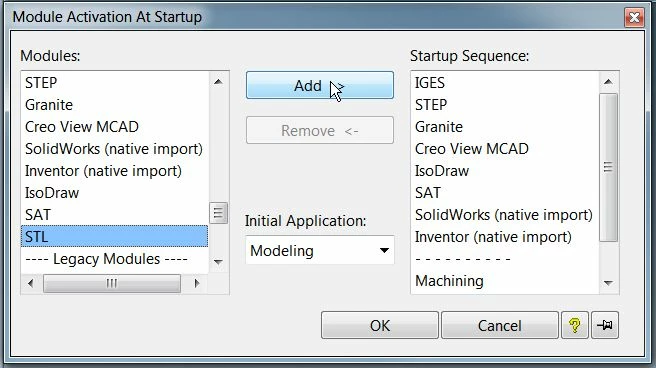
3. From the Modules list, select STL from the Data Interfaces section.

4. Click on Add to add it to the Startup Sequence.

5. Click OK

6. Restart Modeling.

STL at startup.JPGSTL at startup 2.JPGSTL at startup 3.JPG

1 reply

16-Pearl
January 22, 2019

The STL Data interface must be turned on.


1. From the Applications tab, click on the corner arrow of the Base module.

2. From the Modules box, click on Startup.

3. From the Modules list, select STL from the Data Interfaces section.

4. Click on Add to add it to the Startup Sequence.

5. Click OK

6. Restart Modeling.

STL at startup.JPGSTL at startup 2.JPGSTL at startup 3.JPG

1-Visitor
January 22, 2019

It works!


Many thanks again!