

How to improve connection server performance to reduce package lose rate
- There is a test on connection server 7.2. With 4core CPU and 8GB memory, we sent 1000 http requests every second and there is 5% http request losted. After changing configuration for connection server, the lost rate drop to 0.86%.
- Here are some suggestions to improve connection server performance
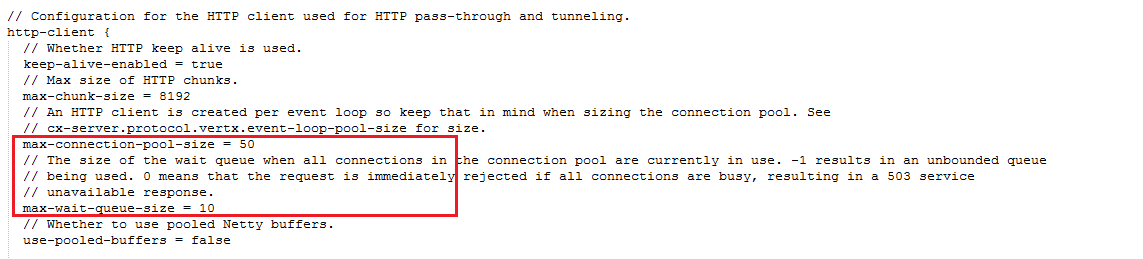
- Reset parameters in connection server configuration file cxserver.conf. (..\conf\cxserver.conf)
- Adjust parameters max-connection-pool-size and max-wait-queue-size
- Change the default JVM settings. (increase memory for JVM properly)
- In this case, I created a new file named startMyConnectionServer.bat file with below code:
SET CONNECTION_SERVER_HOME=C:\connection-server-7.2.0.2095
SET JAVA_OPTS=-Xms2G -Xmx2G
%CONNECTION_SERVER_HOME%\bin\connection-server.bat
- Increase connection server's hardware (memory, CPU cores)
- Minimum system requirement 16GB memory, 4 CPU cores.
- Refer to ThingWorx Core 8.0 System Requirements for more hardware information
- Minimum system requirement 16GB memory, 4 CPU cores.