
16-Pearl
August 7, 2017

SAPODataConnector hands-on (8.0)

  • August 7, 2017
  • 4 replies
  • 14635 views

In this blog I will be testing the SAPODataConnector using the SAP Gateway - Demo Consumption System.


Overview


The SAPODataConnector enables the connection to the SAP Netweaver Gateway through the ODdata specification. It is a specialized implementation of the ODataConnector. See Integration Connectors for documentation.


It relies on three components :

    • Integration Runtime : microservice that runs outside of ThingWorx and has to be deployed separately, it uses Web Socket to communicate with the ThingWorx platform (similar to EMS).
    • Integration Subsystem : available by default since 7.4 (not extension needed)
    • Integration Connector : SAPODataConnector available by default in 8.0 (not extension needed)


ThingWorx can use OAuth to access SAP, but in this blog I will just use basic authentication.


SAP Netweaver Gateway Demo system registration


1. Create an account on the Gateway Demo system (credentials to be used on the connector are sent by email)

2. Verify that the account has access to the basic OData sample service : https://sapes4.sapdevcenter.com/sap/opu/odata/IWBEP/GWSAMPLE_BASIC/


Integration Runtime microservice setup


1. Follow WindchillSwaggerConnector hands-on (7.4) - Integration Runtime microservice setup

Note: Only one Integration Runtime instance is required for all your Integration Connectors (Multiple instances are supported for High Availability and scale).


SAPODataConnector setup


Use the New Composer UI (some setting, such as API maps, are not available in the ThingWorx legacy composer)


1. Create a DataShape that is used to map the attributes being retrieved from SAP

    • SAPObjectDS : Id (STRING), Name (STRING), Price (NUMBER)

2. Create a Thing named TestSAPConnector that uses SAPODataConnector as thing template

3. Setup the SAP Netweaver Gateway connection under TestSAPConnector > Configuration

    • Generic Connector Connection Settings
      • Authentication Type = fixed
    • HTTP Connector Connection Settings
      • Username = <SAP Gateway user>
      • Password = < SAP Gateway pwd>
      • Base URL : https://sapes4.sapdevcenter.com/sap
      • Relative URL : /opu/odata/IWBEP/GWSAMPLE_BASIC/
      • Connection URL : /opu/odata/IWBEP/GWSAMPLE_BASIC/$metadata

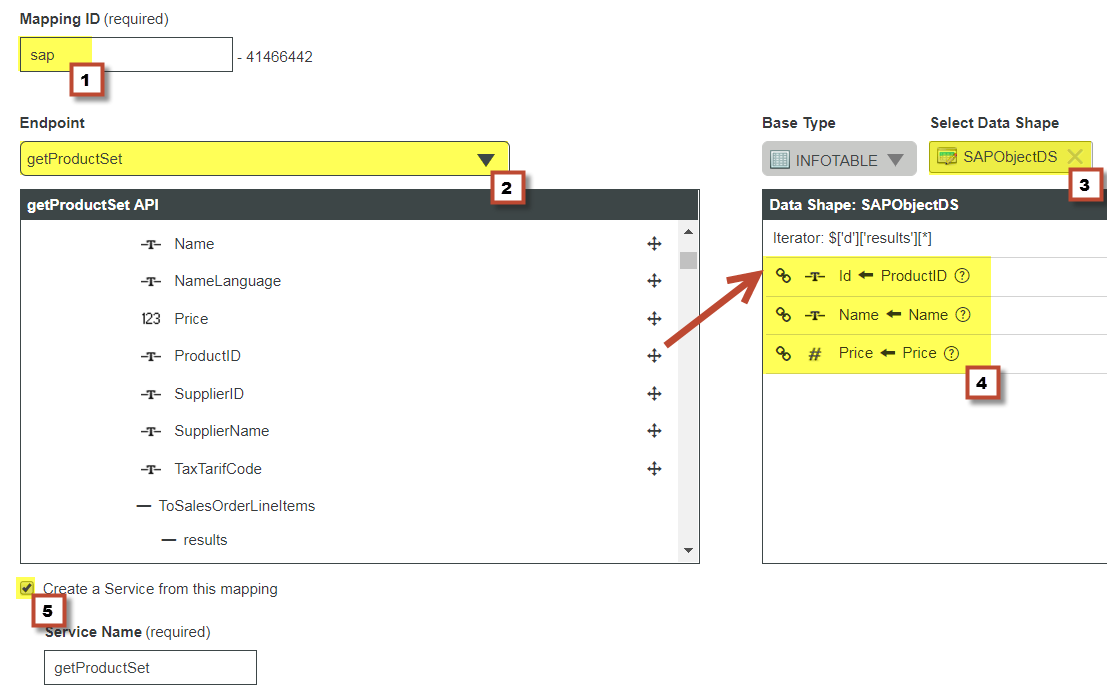
4. Create the API maps and service under TestSAPConnector > API Maps (New Composer only)

    • Mapping ID : sap
    • EndPoint : getProductSet
    • Select DataShape : SAPObjectDS (created at step 1) and map the following attributes :
      • Name <- Name
      • Id <- ProductID
      • Price <- Price
    • Pick "Create a Service from this mapping"


Testing our Connector


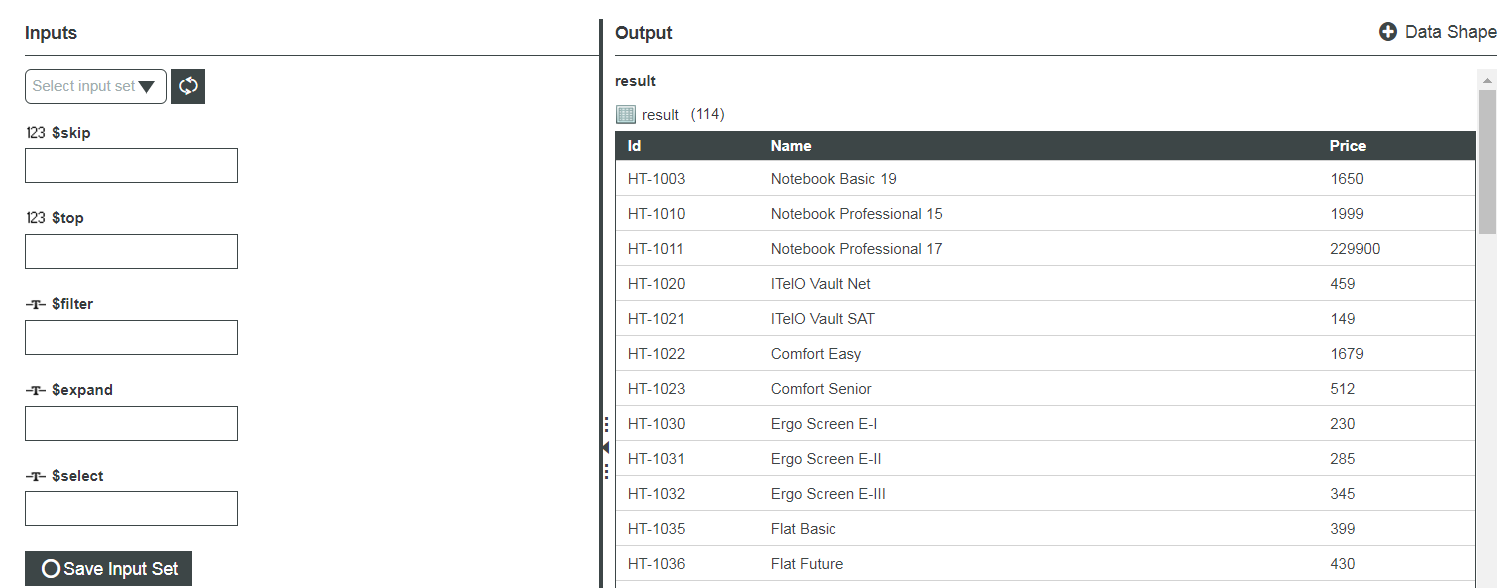
Test the TestSAPConnector::getProductSet service (keep all the input parameters blank)
4 replies

14-Alexandrite
August 10, 2017

Great tool and great cheat sheet for this functionality. Same method works for the WindchillSwaggerConnector!!

1-Visitor
October 11, 2018

Hi @smainente,


I'm trying this tutorial on Thingworx 8.0.1-b39. I have a SAP Gateway - Demo System (ES5) and my account have access to "https://sapes5.sapdevcenter.com/sap/opu/odata/IWBEP/GWSAMPLE_BASIC/". I have the integration runtime properly configured and running.

In Step 3 the following are the parameters i have given:


    • Generic Connector Connection Settings
      • Authentication Type = fixed
    • HTTP Connector Connection Settings
      • Username = <SAP Gateway user>
      • Password = < SAP Gateway pwd>
      • Base URL : https://sapes5.sapdevcenter.com/sap
      • Relative URL : /opu/odata/IWBEP/GWSAMPLE_BASIC/
      • Connection URL : /opu/odata/IWBEP/GWSAMPLE_BASIC/$metadata

The following are the erros i observed :

  • ValidateConnection 

     
    Status Message ConnectorTemplate
    Failed
    Check logs for more details SAPODataConnector


  • GetEndpointList

    [context: com.thingworx.webservices.context.HttpExecutionContext@52e3b401][message: Unable to Invoke Service GetProductSet on ptc-SAP-OData-connector : Your route exchange has failed.  Resource Error [Connect to sapes5.sapdevcenter.com:443 [sapes5.sapdevcenter.com/155.56.38.41] failed: Connection timed out: connect]]


I'm suspecting the error is with this port sapes5.sapdevcenter.com/155.56.38.41 because i tested this URL ("https://sapes5.sapdevcenter.com/155.56.38.41") in the browser and it returned "HTTP 404 - Not found" page.


Could you please point out where i might be going wrong.


Reagrds,

Saran

1-Visitor
October 12, 2018

Hi @smainente,


I have found the root cause for this issue. It seems our internal network was blocking the port since i'm trying out with a external SAP system.


I connected to an external network and tried the same and got positive connection for the OData connector.


Regards,

Saran

7-Bedrock
May 28, 2020

Is it possible to add language information for the connector? 


i.e by adding query parameter? 

  • ?sap-language=DE   


1-Visitor
July 24, 2020

Thanks for the detailed information.

Followed this link for setting up account in demo system 

https://developers.sap.com/tutorials/gateway-demo-signup.html


Also, in my case the URL for OData is

https://sapes5.sapdevcenter.com/sap/opu/odata/IWBEP/GWSAMPLE_BASIC/


1-Visitor
July 27, 2020

Can we set up integration runtime for demo system?

I am trying to download, however it is asking for customer id.