1-Visitor
March 26, 2025
Solved

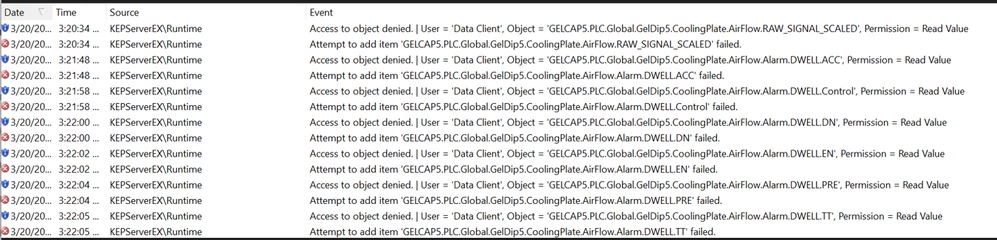
acess to object denied in kepware issue

  • March 26, 2025
  • 1 reply
  • 676 views

RS_13132666_0-1742988839056.png

could you please let me know how to relsolve issue.

Best answer by rajskumar

Hello, 

Please take a look at the following article as it may help resolve your issue:

CS436864 - Error "Access to object denied. | User = 'Data Client', Object = Channel.Device.Tag, Permission = Read Value" in PTC Kepware Products

If you are prompted to log in to view the complete article, you can use your MyKepware login credentials.

1 reply

rajskumar16-PearlAnswer
16-Pearl
March 26, 2025

Hello, 

Please take a look at the following article as it may help resolve your issue:

CS436864 - Error "Access to object denied. | User = 'Data Client', Object = Channel.Device.Tag, Permission = Read Value" in PTC Kepware Products

If you are prompted to log in to view the complete article, you can use your MyKepware login credentials.

1-Visitor
March 26, 2025

Not able to access article.

16-Pearl
March 26, 2025

Article Number

000436864

Title

Error "Access to object denied. | User = 'Data Client', Object = Channel.Device.Tag, Permission = Read Value" in PTC Kepware Products

Description

  • User can not see any tag on Quick Client
  • Getting error  

Access to object denied. | User = 'Data Client', Object = Channel.Device.Tag, Permission = Read Value


Additional Context


Cause

  • Permissions are denied 

Resolution

  • Go to  the Administration Utility > Settings > User Manager > Anonymous Clients >  I/O Tag Access
    • Set Read/Write Value = Allow
OR
​​​​​​​
  • Check the security policy under Administration Utility > Settings >Security Policies>Permission Assigned to Anonymous Clients and clear the saved one
  • Note- Someone might have configured this for safety, so it is suggested to check with your team
 
  •  
    rajskumar_3-1742990254058.png