
3-Newcomer
February 3, 2026
Solved

Atlascopco PF6000 and Kepserver Issue

  • February 3, 2026
  • 1 reply
  • 113 views

1. Kepserver configured with Channel ->Torque Tool Ethernet Device 

2.Device is configured with Controller IP address and Port Number :4545

3.Pinged Atalscopco controller from hosting machine(My Laptop) sucessfull

4.Port Testing Sucessfull 

5.Revisonnumbers are configured 

6.Atlascopco Virtual station configured 

7.Expected Tags will imported automatically - but it was not showing anything 

8.And ,when I'm trying to define tags manually getting syntax error 

Could you please let me know ,automatic tag import is possible? or Do we need to subscribe ? How to establish the basic communication and R/W data ?
Best answer by rajskumar

Hi,


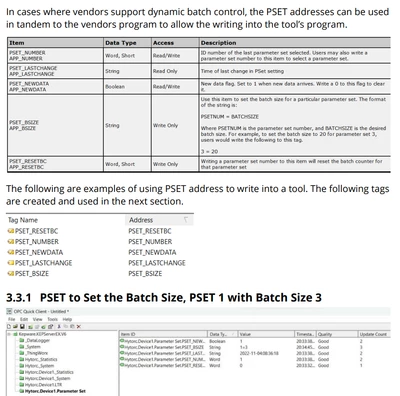
Automatic tag generation is not possible with this driver. You need to configure the tags manually.

You can refer to the driver help file to understand tag addressing.

Torque Tool Ethernet

Here is an example of tag addressing as well. Thanks 

rajskumar_0-1770120786146.png


1 reply

rajskumar16-PearlAnswer
16-Pearl
February 3, 2026

Hi,


Automatic tag generation is not possible with this driver. You need to configure the tags manually.

You can refer to the driver help file to understand tag addressing.

Torque Tool Ethernet

Here is an example of tag addressing as well. Thanks 

rajskumar_0-1770120786146.png


3-Newcomer
March 13, 2026

Thank you ,finally able to test this it is working