6-Contributor
January 19, 2026
Solved

Communication Issue Between Mitsubishi PLC and Kepserver

  • January 19, 2026
  • 5 replies
  • 333 views

Dear All,


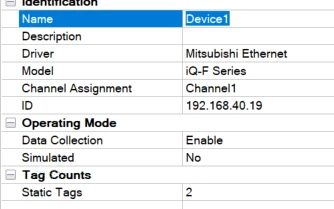
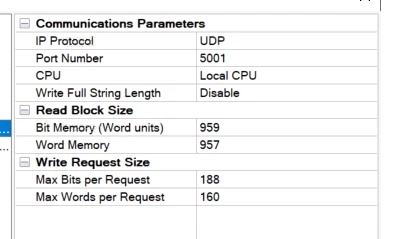
I am trying to communicate FX5 with Kepserver, however failing to connect despite different trials. I have set PLC setting to SLMP setting with both TCP and UDP port and set it accordingly on the Kepserver. Still not able to communicate with the PLC with Tags value as BAD.

I am attaching the pictures for reference also.


Danyal_0-1768813286693.pngDanyal_1-1768813303980.pngDanyal_2-1768813319441.png


Best answer by MRohilla

Greetings,

For the IQ-F series setup ports can be configured for TCP/IP or UDP communication. While TCP/IP is reliable, it is less efficient and requires multiple ports for remote network communication. UDP is recommended wherever possible for better performance. After changing network parameters on the PLC must perform a power cycle for the changes to take effect.


Please refer to the iQ-F Series PLC setup guide here:

<https://support.ptc.com/help/kepware/drivers/en/index.html#page/kepware/drivers/MITSUBISHIETHERNET/iQ_F_Series_PLC_Setup.html#>

For further details of IQ-F series setup refer to the manufacturer's documentation for current and official instructions.


Also, please verify the different UDP port numbers on the PLC side and also check the Network and Station ID. Please keep us informed about your progress

Regards,
Mohit

5 replies

MRohillaCommunity ManagerAnswer
Support
February 2, 2026

Greetings,

For the IQ-F series setup ports can be configured for TCP/IP or UDP communication. While TCP/IP is reliable, it is less efficient and requires multiple ports for remote network communication. UDP is recommended wherever possible for better performance. After changing network parameters on the PLC must perform a power cycle for the changes to take effect.


Please refer to the iQ-F Series PLC setup guide here:

<https://support.ptc.com/help/kepware/drivers/en/index.html#page/kepware/drivers/MITSUBISHIETHERNET/iQ_F_Series_PLC_Setup.html#>

For further details of IQ-F series setup refer to the manufacturer's documentation for current and official instructions.


Also, please verify the different UDP port numbers on the PLC side and also check the Network and Station ID. Please keep us informed about your progress

Regards,
Mohit

Danyal6-ContributorAuthor
6-Contributor
February 3, 2026

Hi Mohit, 


I have already done all this steps, however, issue still persists. Moreover, I have seen all the help or manuals with FX5U CPU(s) , whereas, I am using FX5S. Does it have something to do with this ?

4-Participant
August 28, 2026

I have face the same issue with  IQ-R series & Mohit you have  recommended to use UDP Protocol wherever possible -Issue with UDP it does not support -telnet , TCP-netconnection etc command to check the issue.

Guide to solve the Issue.

3-Newcomer
September 9, 2026

I have the same issue, with FX5U. I’ve already tried steps presented by MRohilla , but with no luck. Is there anything else I can check or diagnose the issue?

Support
September 14, 2026

Greetings,

Thank you for the additional information.

Since the communication parameters appear to be configured correctly and the issue persists across multiple installations, we recommend performing the following checks:

  • Verify that the configured Network Number, PC Number, Station Number, and Module I/O Number in KEPServerEX exactly match the settings configured in the Mitsubishi PLC.
  • Confirm that no firewall, managed switch, or network security device is blocking the configured communication ports.
  • Use Wireshark or a similar packet capture tool to determine whether request packets are reaching the PLC and whether any response packets are being returned.
  • If available, test communication using Mitsubishi's engineering software (GX Works/GX Developer) from the same PC and network path to validate basic connectivity.
  • Review the KEPServerEX Event Log and enable Diagnostics to identify any communication-specific error messages.

Please note that the Mitsubishi Ethernet driver communicates using Mitsubishi's protocol and does not support troubleshooting through Telnet or generic TCP connection tests when UDP communication is being used.

For the users using the FX5U/FX5S series, please verify that the CPU model and Ethernet module are supported by the version of KEPServerEX in use, and ensure the PLC's built-in Ethernet settings have been configured according to Mitsubishi's documentation.


If the issue continues, please raise a support ticket, additionally provide:

  • KEPServerEX version
  • PLC model (FX5U, FX5S, etc.)
  • Driver settings screenshots
  • Event Log messages
  • A Wireshark capture taken while attempting communication

With this information, we can review the communication sequence in greater detail and provide further recommendations.

Reagrds,
Mohit