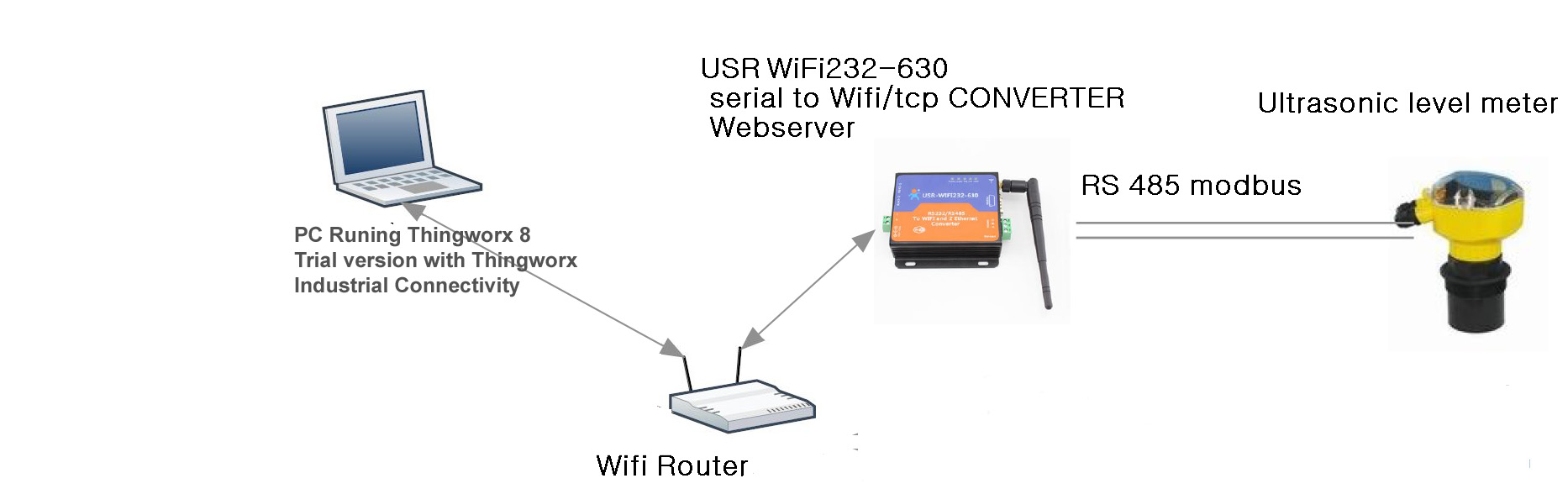
Hi Patrick,
Thanks for sharing the device documentation, that gives us some key insight.
To read the "0000" register, here are the steps you will want to follow:
1. Create a new tag. Name it "0000", to align with the documentation you have for the device.
2. For the address, enter "40001". Since the address is an "Analog Output", being read by Function Code 3, this tells us it is an Analog Output Holding Register in KEPServerEX, which is addressed as "4xxxx". Per the Modbus Spec, the default setting for "Zero-based addressing" is Enabled. You can shift all of your address by 1 (i.e. 0000 is 40001, 0001 is 40002, etc); or you can disable this setting in the Device Properties, within the Settings property group (i.e. 0000 is 40000, 0001 is 40001, etc).
3. For the Data Type, keep this as Default, or manually set it to Word. This is the default 16-bit (2 byte) Modbus Holding Register data type.
4. Launch the Quick Client and locate your tag. Are you seeing the value you expect? You may need to Disable the "Modbus Byte Order" in the Device Properties > Settings property group.
For more information on Modbus addressing, here is a link to the "Modbus Addressing" section of the KEPServerEX Modbus RTU driver help manual:
https://www.kepware.com/en-us/products/kepserverex/drivers/modbus-serial/documents/modbus-serial-manual.pdf#page=28
Simply Modbus is also an excellent resource for understanding this protocol:
Simply Modbus - About Modbus
For the second part of your question, is it important to note KEPServerEX is bringing the raw values from the Device and converting them into whichever Data Type you have specified. To multiply the value, you will need use a Client application, or ThingWorx. There is an internal Client Plug-in available called Advanced Tags. By creating a Derived Tag within Advanced Tags, you could apply arithmetic operations to a value to produce a new value that will be read by a Client or ThingWorx (for example, to multiple the value by 1000).
While you will not be able to embed the units with the raw value in the same tag, It may be possible to create a separate tag that contains a String value representing the units. I can't tell, how do you extrapolate the units from what the Device has sent? It appears the units might be a setting put in place on this Device that will be universal for all values.
Best regards,
Steven M