7-Bedrock
January 21, 2026
Solved

datalogger timestamp

  • January 21, 2026
  • 1 reply
  • 223 views

Hi everyone

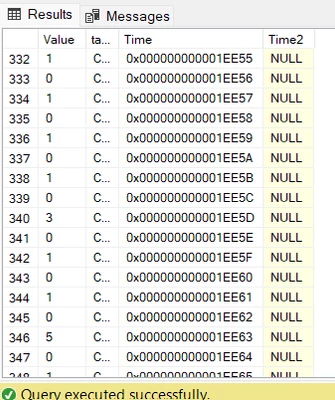
Basically I'm trying to log data into an SQL server, I get the correct tag value and tag name, but with the time I'm not able to see it correctly in SQL 
In SQL I have the column Time as data type: timestamp

and the data that logs is in hexadecimal, so is not what I want

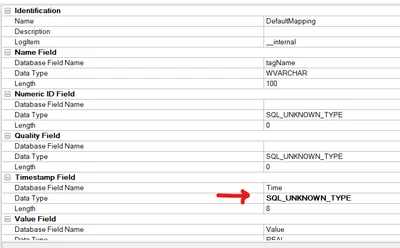
I've actually use data type datetime2 as well in sql but then I get an error in Kepware (Error Data Logger Plug-in Unable to query recordset on Log Group 'loggroup'. Reason: Conversion failed when converting date and/or time from character string)

You can see it in the snapshots 
FG_11085366_1-1769026697397.png


FG_11085366_0-1769026654643.png


does anyone know how can I actually submit the time in the SQL server? or like what datatype should be in Kepware and SQL? please help 

Best answer by FG_11085366

The answer was really simple, just added a new column in my SQL with datatype "datetime" and changed the Database Field Name to the new column with datatype "datetime" and worked, I know it sounds really simple but I was dumb enough to make it bad the first time lol


Hope this helps someone as distracted as me

1 reply

FG_110853667-BedrockAuthorAnswer
7-Bedrock
January 22, 2026

The answer was really simple, just added a new column in my SQL with datatype "datetime" and changed the Database Field Name to the new column with datatype "datetime" and worked, I know it sounds really simple but I was dumb enough to make it bad the first time lol


Hope this helps someone as distracted as me