

How to Extract a Specific Value from an OPC UA String Tag in KEPServerEX 6.18 Using Advanced Tags
Dear PTC Technical Support Team,
I am using PTC Kepware KEPServerEX version 6.18 and have the Advanced Tags plug-in installed.
I have connected a machine through its OPC UA server and am receiving a tag with the String data type. The string contains multiple fields separated by a pipe (|) delimiter.
Example input string:
123|Temperature|25.6|°C
The string format is:
ID|Name|Value|Unit
I need to extract only the third field (25.6) and make it available as a separate tag in KEPServerEX. The source string updates continuously, so the extracted value must update automatically whenever the source tag changes.
My questions are:
- Does KEPServerEX 6.18 support extracting a specific field from a String tag using the built-in Advanced Tags or Derived Tags functionality?
- If yes, please provide the exact, valid expression syntax and step-by-step configuration instructions to extract the third field between the second and third
|delimiters. - What should the destination tag's data type be if I need the extracted result as a numeric value rather than a string?
- If this functionality is not supported by Derived Tags, what is the recommended supported method using the features available in KEPServerEX 6.18?
- Is there any built-in feature, driver, plug-in, or licensing requirement that would allow this extraction to happen entirely within Kepware, without an external application or script?
Expected result:
Input: 123|Temperature|25.6|°C
Output: 25.6
My requirement is to extract the value reliably from the incoming OPC UA string and expose it as a separate Kepware tag.
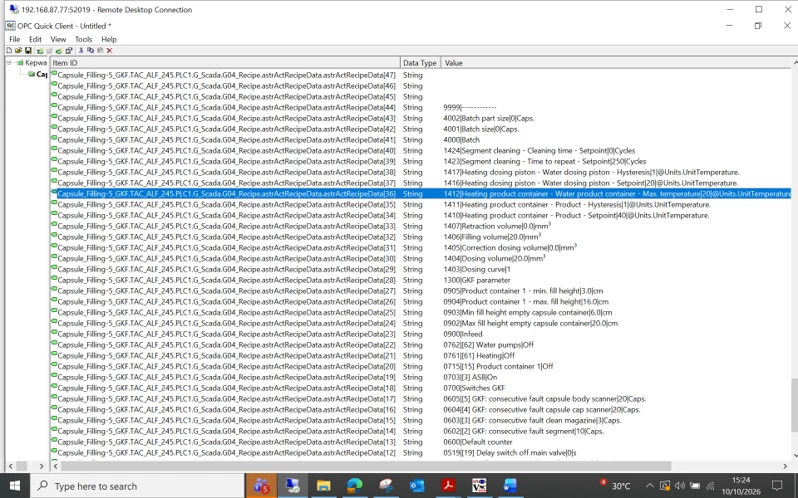
Please provide a working example or a supported configuration procedure specific to KEPServerEX 6.18.
Thank you.