5-Regular Member
December 8, 2025
Solved

How to use Kepware Logger

  • December 8, 2025
  • 1 reply
  • 186 views

Hello Kepware Community

I am currently tinkering with the KepServerEX capabilities and have come across some unusual behavior. My task is to connect the Kepware to an MQTT server, retrieve the payload, and parse it into SQL. Everything goes smoothly if I use Kepware's default logging, which has 4 fields: numeric_id, quality, time_stamp, and value.
It is ok when use a Narrow table format setting, which I set it as follows.
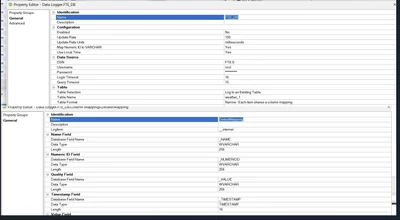
TT_14396921_0-1765184404134.png

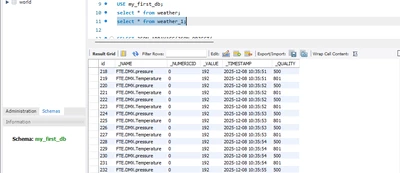
And it return this sql table

TT_14396921_1-1765184444214.png

Now I have a custom table that need to be fill
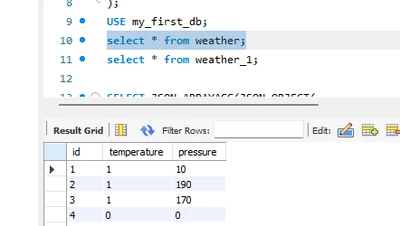
TT_14396921_2-1765184502280.png

And my column(s) set up, they have the same column register
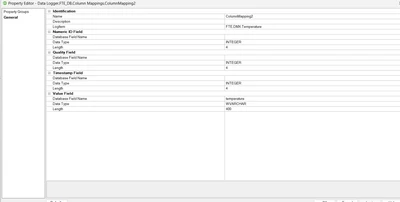
TT_14396921_3-1765184563667.png

The logger is up and running, no error log but it does not log anything to the table.
Which setting that I need to change ? Many thanks in advance. Have a great day.
Best regards
Tran Duc Thinh



Best answer by pshashipreetham

Hi, 


What’s happening here is expected behaviour. Kepware’s DataLogger is still operating in tag-based mode, but the custom table requires event-driven inserts rather than passive column mapping. When all columns point to the same register or JSON source, Kepware sees no column-level change trigger, so nothing gets written,n even though the logger shows “running”.


The fix is simple and does not require scripting. Set Trigger Mode on the DataLogger to On Data Change or On Interval, and map only one column as the trigger field. That column must change every cycle. Typical pattern is to use a timestamp or an incrementing value as the trigger, while other columns are read from JSON fields. Once the trigger changes, Kepware commits the whole row.


Bottom line: custom tables do not auto-insert when a value is present. They insert only on trigger change. Add a real trigger column, and logging starts immediately.


Thanks,

1 reply

18-Opal
December 23, 2025

Hi, 


What’s happening here is expected behaviour. Kepware’s DataLogger is still operating in tag-based mode, but the custom table requires event-driven inserts rather than passive column mapping. When all columns point to the same register or JSON source, Kepware sees no column-level change trigger, so nothing gets written,n even though the logger shows “running”.


The fix is simple and does not require scripting. Set Trigger Mode on the DataLogger to On Data Change or On Interval, and map only one column as the trigger field. That column must change every cycle. Typical pattern is to use a timestamp or an incrementing value as the trigger, while other columns are read from JSON fields. Once the trigger changes, Kepware commits the whole row.


Bottom line: custom tables do not auto-insert when a value is present. They insert only on trigger change. Add a real trigger column, and logging starts immediately.


Thanks,