3-Newcomer
July 22, 2026
Question

Kepserver Memory Leak

  • July 22, 2026
  • 1 reply
  • 35 views
Nonpaged Memory increase over time

I have trouble with linearly increasing “Nonpaged memory” allocation. I inspect the memory allocation with RAMMap. 

Our machines server system keeps getting slower and slower, so we started investigating.

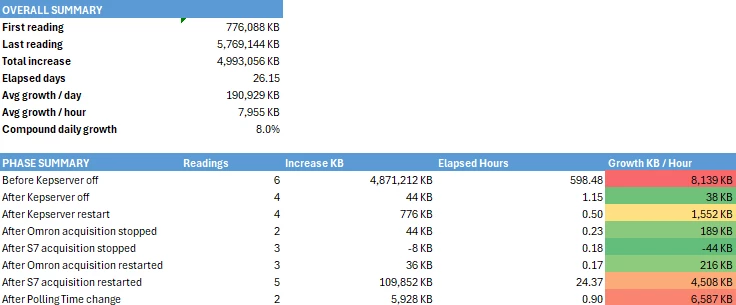
The picture above shows it: “Nonpaged memory” started at 776,088 KB after rebooting the HyperV. After that, it increased up by 5 GB in total.

Our setup is:

  • HyperV with Windows Server 2019; Host is Windows Server 2022. 
  • On the HyperV: KEPServerEX 6.15 / V6.15.154.0
    • Omron FINS Ethernet (16 devices; CJ2 PLCs)
    • Siemens TCP/IP Ethernet (1 device; S7-300)
    • OPC UA Server as the connector to our SCADA system (Running on the same HyperV)

In the second table, you can see that the memory allocation stops growing once I turn off Kepserver. There is one section where the memory doesnt grow even though the Omron acquisition is running. I think that in that case the time period is too short.


Questions:

  • Did you ever face a similar issue?
  • Any ideas how to solve it?
  • What should I try?

1 reply

Support
August 3, 2026

Greetings ​@KevinStephanMartin,

The behavior suggests that the nonpaged memory growth is being triggered by communication activity within KEPServerEX rather than by general Windows memory usage. Since the growth stops when KEPServerEX is stopped and is reduced when device acquisition is disabled, we recommend focusing on the configured device drivers, especially the Omron FINS Ethernet channel.

As next steps:

  • Verify if the issue persists with only the Omron channels disabled.
  • Review Kepware Event Log for repeated communication errors, reconnects, or timeouts.
  • Temporarily increase the scan rate/polling interval and monitor whether memory growth decreases.
  • Confirm the OPC UA client is not repeatedly reconnecting or creating new subscriptions.
  • Upgrade to the latest available KEPServerEX maintenance release/hotfix if not already done.

Since the growth is occurring in Nonpaged Pool memory, we also recommend collecting a PoolMon trace to identify the kernel pool tag responsible for the allocations. This will help determine whether the memory is being consumed by a Kepware communication component, a network driver, or another kernel-mode driver interacting with Kepware traffic.


Regards,

Mohit