
4-Participant
June 23, 2025
Solved

KepserverEX Kep Configuration cannot connect to Kep Runtime

  • June 23, 2025
  • 1 reply
  • 770 views

Despite the Runtime is still running, I don't seem to be able to use KEPServerEX Configuration to connect to that Runtime even though they are both on the same machine.


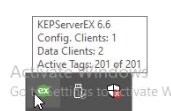
By reviewing several articles, I'm convinced that there could be some hidden Config Client that is still holding on to that session, therefore I won't be able to connect to the Runtime Project.
DN_12742959_0-1750655191065.png


Should I restart the entire machine? or just the Runtime service? or both?


Best answer by ntripathi

Greetings @DN_12742959,


I hope this email finds you well.


You're likely on the right track, suspecting that a hidden KEPServerEX Configuration client session might be holding onto the Runtime, preventing new connections. Here's what you can try before restarting the entire machine:


This is usually sufficient and less disruptive than a full reboot.

  1. Open Services (services.msc).
  2. Locate KEPServerEX Runtime.
  3. Right-click and choose Restart.

This will terminate any lingering sessions and allow a fresh connection from the Configuration client.


1 reply

ntripathi15-MoonstoneAnswer
15-Moonstone
June 23, 2025

Greetings @DN_12742959,


I hope this email finds you well.


You're likely on the right track, suspecting that a hidden KEPServerEX Configuration client session might be holding onto the Runtime, preventing new connections. Here's what you can try before restarting the entire machine:


This is usually sufficient and less disruptive than a full reboot.

  1. Open Services (services.msc).
  2. Locate KEPServerEX Runtime.
  3. Right-click and choose Restart.

This will terminate any lingering sessions and allow a fresh connection from the Configuration client.


4-Participant
June 24, 2025

I was kind of lazy haha, so I rebooted the whole machine, everything went back to normal.


From retrospect, right before I came across this issue, I remembered having finished adding some more new Channels and was testing with a Quick Client. Everything then crashed and I found myself not being able to open the Configuration Utility.


Do you have any idea why this happens?

15-Moonstone
June 24, 2025

Greetings @DN_12742959,


Thank you for your confirmation. 

To identify the exact root cause of the crash and prevent recurrence, we’ll need to capture an Application Report utility (ARU) dump the next time the crash occurs.

This will allow us to analyze the system state at the time of failure and pinpoint the underlying issue more accurately.