
3-Newcomer
August 8, 2024
Solved

Kepware 6.9.584.0 Error - ...controller project from device. Resorting to symbolic protocol.

  • August 8, 2024
  • 2 replies
  • 3500 views

Looking for a better understanding of the error we encountered in Kepware:


"<DEVICE> | The following errors occurred uploading controller project from device. Resorting to symbolic protocol."


We had an issue in our plant where connectivity between Kepware and several Allen-Bradley PLCs were dropping out intermittently due to a networking issue.  Approximately 3 minutes after this event started, we saw the above error message posted for all PLC's involved.  While the message states the "following errors occurred" we never saw an actual message with details.  Just the line above.  


For context, all PLC's involved were originally setup with Logical Non-Blocking addressing.  Kepware changing/resorting to using Symbolic addressing appears to have overwhelmed a combination of the PLC, network and driver.  We were unable to recover until we restarted the Kepware server.


We've seen Kepware make the switch to Symbolic addressing when controls engineers are actively in the program, but we usually see an entry in the logs.  Also we also see addressing is changed back to Logical when controls closes the program.  In this case, no entry was made in the logs stating controls was online at this time.  We've attempted to find additional information on the error code but have been unsuccessful so far.  Hoping the community may have some kind of explanation.


  • What condition causes Kepware to resort to using Symbolic addressing (other than controls going online with the program)?
  • Is there a way to revert Kepwares decisions to using Symbolic addressing without having to restart the whole service?
Best answer by aservetas

Please take a look in the help manual here:


Allen-Bradley ControlLogix Ethernet


under the section titled


Detecting a Change in the Controller Project


The driver will monitor multiple components of the response packets from the controller to determine if the project has been changed/modified while we are polling for tags.  If one or more of those components has changed, the driver will drop into Symbolic mode automatically to continue to supply tag values to the connected client applications.


If no change is detected for at least 30 seconds, the driver will then attempt to re-sync the Logical address table from the controller and resume the use of Logical based addressing. Reads and writes to the controller will pause during this re-sync process.


When this occurs, you should also see these messages in the Event Log (also shown in the help file):


Read/Write requests to device stopped. Updating Logical Addresses from device project.
Error Type: Warning


Read/Write requests to device resumed. Updating Logical Addresses from device complete. Currently using Logical addressing.
Error Type: Warning


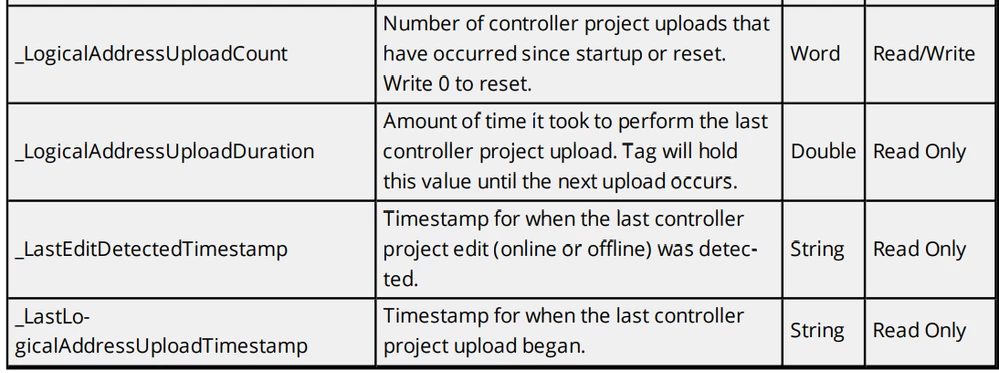
Additionally, you can monitor the state of the re-sync through the use of these internal tags:


aservetas_0-1724774539246.png

Please note that these tags and Event Log messages are only in the v6.8 releases of the product.


-Andy

Andy Servetas
Principal Technical Support Engineer | Kepware Technologies


2 replies

24-Ruby III
August 9, 2024

Article - "Slow Communication when writing to Allen Bradley ControlLogix Ethernet driver using Symbolic Protocol in PTC Kepware products": https://www.ptc.com/en/support/article/CS420687 

3-Newcomer
August 9, 2024

Appreciate the article but unfortunately doesn't address the issue I posted.  We understand that using Symbolic addressing can slow communication which is why we've configured all PLC's to use Logical Non-Blocking addressing.  The problem as mentioned above is Kepware forced these devices to use Symbolic addressing after a period of network connectivity issues.  Controls engineers did not have the program online.  We had no way to recover from the Symbolic addressing that Kepware forced the devices to use, aside from restarting the server itself.


Still trying to understand:


  • What condition causes Kepware to resort to using Symbolic addressing (other than controls going online with the program)?
  • Is there a way to revert Kepwares decision to using Symbolic addressing without having to restart the whole service?
aservetas15-MoonstoneAnswer
15-Moonstone
August 27, 2024

Please take a look in the help manual here:


Allen-Bradley ControlLogix Ethernet


under the section titled


Detecting a Change in the Controller Project


The driver will monitor multiple components of the response packets from the controller to determine if the project has been changed/modified while we are polling for tags.  If one or more of those components has changed, the driver will drop into Symbolic mode automatically to continue to supply tag values to the connected client applications.


If no change is detected for at least 30 seconds, the driver will then attempt to re-sync the Logical address table from the controller and resume the use of Logical based addressing. Reads and writes to the controller will pause during this re-sync process.


When this occurs, you should also see these messages in the Event Log (also shown in the help file):


Read/Write requests to device stopped. Updating Logical Addresses from device project.
Error Type: Warning


Read/Write requests to device resumed. Updating Logical Addresses from device complete. Currently using Logical addressing.
Error Type: Warning


Additionally, you can monitor the state of the re-sync through the use of these internal tags:


aservetas_0-1724774539246.png

Please note that these tags and Event Log messages are only in the v6.8 releases of the product.


-Andy

Andy Servetas
Principal Technical Support Engineer | Kepware Technologies


3-Newcomer
August 27, 2024

I appreciate the response, Andy!


We've seen Kepware resort to Symbolic addressing when the controls engineer goes online with the program, that's not the problem.  The issue I've outlined in my first post was Kepware going into a state of Symbolic addressing without a controls engineer going online.  The plant experienced some intermittent network connectivity that caused the PLC's to drop and recover communication over a period of 3 minutes or so. Kepware (on its own) switched from Logical addressing to Symbolic addressing without any intervention or controls engineer going into the program.  Kepware then continued to maintain communication using Symbolic addressing until we forced the server to restart.  Once restarted, Kepware reverted back to Logical addressing.


Unfortunately, I still have the same questions as before:


  • What condition would cause Kepware to resort to using Symbolic addressing other than controls going online with the program?
  • Is there a way to revert Kepwares decision to using Symbolic addressing without having to restart the physical server?  Can we just restart the Kepware service?


I will take a look at these additional tags to see if it can provide some further troubleshooting in the future.

15-Moonstone
August 27, 2024

There are multiple component monitored in the controller responses, so I was not able to get a succinct list of 'causes' from R&D.  I also confirmed that once the driver no longer sees those changes, it should indeed revert back.


One question to you would be how many tag items are you reading from those controllers?  The typical break point we see for performance in protocol modes is between 20k and 25k items per second (depending on datatypes in the mix of tags). So if you are reading less than that number of tags from any single controller you could just set it to run all the time in Symbolic mode and leave it that way.


-Andy