15-Moonstone
August 16, 2021
Solved

kepware "Device is not Responding"

  • August 16, 2021
  • 2 replies
  • 3379 views

Hi all,

I am using Thingworx 8.4.3 and Kepware 6.6. I have established the connectiving between Thingworx and Kepware successfully. But somethime there is an error on Kepware "Device is not Responding", but I don't see any change in my signals. The quality of signals is good.

I want to raise an alert/ alarms whenever this error occurs. Is there any way where I can store this error into some Tags on kepware and then fetch that tag to thingworx and then raise an alarm or from kepware itself an alram can be generated ? 


Thank you!

 

Best answer by hchanana

Hi @MM_9023322 ,


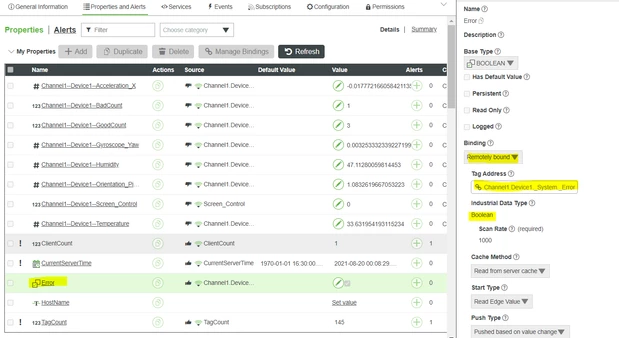
You can create a new property on the thing which will bind to error tag under _System tag of asset in the quick client.


hchanana_0-1629401021800.png


On the composer, this property will be remotely bind to kepware tag address like below

hchanana_1-1629401118797.png


After that you can set alert on the local property (Error) you created.

Hopefully this approach would help you.


Thanks,

Himanshu

2 replies

hchanana16-PearlAnswer
16-Pearl
August 19, 2021

Hi @MM_9023322 ,


You can create a new property on the thing which will bind to error tag under _System tag of asset in the quick client.


hchanana_0-1629401021800.png


On the composer, this property will be remotely bind to kepware tag address like below

hchanana_1-1629401118797.png


After that you can set alert on the local property (Error) you created.

Hopefully this approach would help you.


Thanks,

Himanshu

12-Amethyst
December 7, 2022

I have implemented this approach on Thingworx 9.1 as well and a while back it was working just fine.


At some point, it stopped working and it seems to be a later version of Kepware that broke the availability of this tag to ThingWorx.


Unfortunately, I can't recall the version of Kepware we used at the time.


@hchanana what version of Kepware / ThingWorx does this work in?

Community Manager
August 27, 2021

Hi @MM_9023322


If the previous response answered your question, please mark it as the Accepted Solution for the benefit of others with the same question.


Regards.


--Sharon