Kepware Mitsubishi Driver Ethernet to CC-Link IE-Field
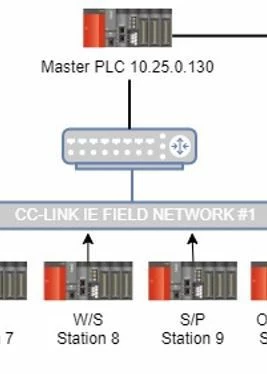
I'm currently testing KEPServerEX 6 in a highly Mitsubishi Focused facility. We have many Mitsubishi PLC's but only six are on a ethernet network and are considered "Masters." The majority of the Masters are connected to other Mitsubishi PLC's via CC-Link IE-Field. I have been able to connect to one of the Master PLC's and create tags, data log to sql, etc. I am trying now to pull data (X's and D's) directly from a PLC on the the CC-Link IE-Field network. For example in the attached picture i'm trying to connect to W/S Station 8. In the Mitsubishi driver I have the ID set to 10.25.0.130:N1:8. The I.P. is the Built in Ethernet Port I.P. on the Master PLC which I can connect to just fine. Then N is Network 1 which is a CC-Link IE-Field Master Card on the Master PLC rack and 8 is Station 8 on the CC-Link IE-FIield. When I try to monitor those the tags in Quick Client I get this error.
Date Time Level Source Event
1/30/2023 12:32:29 PM Error Mitsubishi Ethernet Mitsubishi Q Series.Waste Water 2 | Unable to read from address block on device. The device reported an invalid address or an error. | Address block = 'X0070' to 'X007F'.
So is what i'm trying to do even possible or does all of the PLC's have to be on a Ethernet Network that could be multilevel for Kepware to be able to read addresses directly?