
3-Newcomer
May 29, 2025
Solved

PAC3200 TCP/IP vs Kepware

  • May 29, 2025
  • 1 reply
  • 603 views

Hello developers,

I am trying to read value of energy consumption from PAC3200 connected through TCP/IP.

Could you share with me what is the address for this value, which would be readable?

I will share with you addresses and values which I am getting, but none of them seems correct.
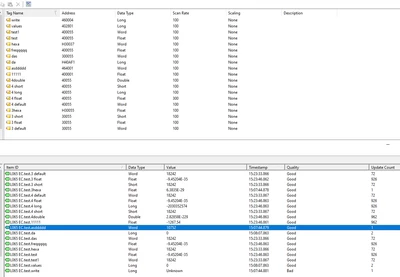
MB_10908610_0-1748525069141.png


Thank you for your help

Best answer by pshashipreetham

Hi, 


  1. Common Register: For Siemens PAC3200, the total active energy (kWh) is usually at Modbus address 40093. Depending on the Modbus mode, it may also appear as 4092 (zero-based offset).

  2. Data Type: Set the data type as Float (32-bit). The energy values are typically stored in IEEE-754 format.

  3. Swap Words: In many PAC devices, Modbus registers are stored in two 16-bit words. Enable "Swap Words" in KEPServerEX if values appear to be in the wrong order or reversed.

  4. Alternate Addresses: If 40093 doesn’t give correct data, try:

    • 40091

    • 40092

    • 40094
      Always test them as Float with and without word swap.

  5. Modbus Scanner: Use a tool like ModScan32 or QModMaster to read registers directly and verify correct values outside of KEPServerEX.

  6. Manual Confirmation: Download the Siemens PAC3200 Modbus register map (PDF) from Siemens' official site. That document confirms exact addresses for energy-related values.

  7. Example Setup in KEPServerEX:

    • Tag Name: Energy_Total

    • Address: 40093

    • Data Type: Float

    • Swap Words: Enabled (if needed)

    • Scan Rate: 1000 ms (or as needed)

This approach will help you correctly read energy consumption from PAC3200 using Modbus TCP in KEPServerEX.


Thanks,

1 reply

18-Opal
June 2, 2025

Hi, 


  1. Common Register: For Siemens PAC3200, the total active energy (kWh) is usually at Modbus address 40093. Depending on the Modbus mode, it may also appear as 4092 (zero-based offset).

  2. Data Type: Set the data type as Float (32-bit). The energy values are typically stored in IEEE-754 format.

  3. Swap Words: In many PAC devices, Modbus registers are stored in two 16-bit words. Enable "Swap Words" in KEPServerEX if values appear to be in the wrong order or reversed.

  4. Alternate Addresses: If 40093 doesn’t give correct data, try:

    • 40091

    • 40092

    • 40094
      Always test them as Float with and without word swap.

  5. Modbus Scanner: Use a tool like ModScan32 or QModMaster to read registers directly and verify correct values outside of KEPServerEX.

  6. Manual Confirmation: Download the Siemens PAC3200 Modbus register map (PDF) from Siemens' official site. That document confirms exact addresses for energy-related values.

  7. Example Setup in KEPServerEX:

    • Tag Name: Energy_Total

    • Address: 40093

    • Data Type: Float

    • Swap Words: Enabled (if needed)

    • Scan Rate: 1000 ms (or as needed)

This approach will help you correctly read energy consumption from PAC3200 using Modbus TCP in KEPServerEX.


Thanks,
