
1-Visitor
October 13, 2025
Solved

Unable to get Kepware activation_response file

  • October 13, 2025
  • 1 reply
  • 303 views

I need to transfer a Kepware license (offline)...  

1. I created the trasfer_request file on the 1st server... no issues

2. I uploaded the transfer_request file to kepware portal... no issues

3. I created the activation_request file in the 2nd server... no issues

4. I uploaded the activation_request file to kepware portal and everything seems to be ok... I complete the form with the requested information... no issues

5. however when trying to create the activation_response file, the file is not generated and google is only redirecting me to a page with the next title "Legal Policies, Agreements and Disclaimers" (see attached image)

Please advise... I really need to get the activation_response file in order to activate the 2nd server.
Best answer by CC_11858012

Hi @RH_9899114 ,

Request you to open a case with us and we can assist you with the issue as it seems you could have Kepware portal issues or other issues as well and we would require more details to be able to assist you with the issues. 

Refer this article for guidance on how to open a support case with us. 


If you are prompted to log in to view the complete article, you can use your MyKepware login credentials.


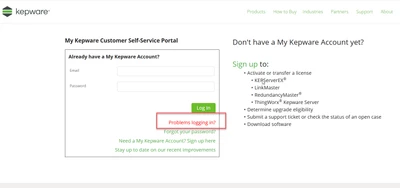
If you are not able to create a case due to login failure, click on "Problem logging in?" and submit a ticket for it. Have highlighted in the below snap.

PTC_Community.png


1 reply

12-Amethyst
October 14, 2025

Hi @RH_9899114 ,

Request you to open a case with us and we can assist you with the issue as it seems you could have Kepware portal issues or other issues as well and we would require more details to be able to assist you with the issues. 

Refer this article for guidance on how to open a support case with us. 


If you are prompted to log in to view the complete article, you can use your MyKepware login credentials.


If you are not able to create a case due to login failure, click on "Problem logging in?" and submit a ticket for it. Have highlighted in the below snap.

PTC_Community.png