

1-Visitor
March 2, 2016
Question

BLK FRM tool travel envelope

  • March 2, 2016
  • 1 reply
  • 2534 views

Hi,

How add blk form in  post processor  Heainden 5 axis.
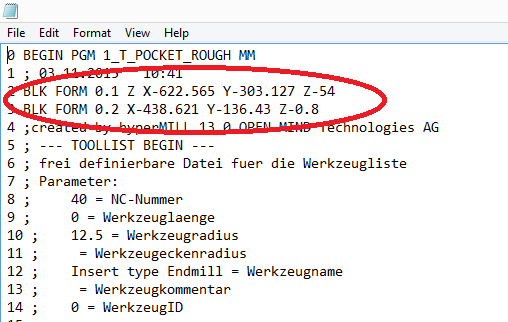
Untitled.png


This thread is inactive and closed by the PTC Community Management Team. If you would like to provide a reply and re-open this thread, please notify the moderator and reference the thread. You may also use "Start a topic" button to ask a new question. Please be sure to include what version of the PTC product you are using so another community member knowledgeable about your version may be able to assist.

1 reply

1-Visitor
March 4, 2016

I don't believe this can be configured somewhere.

You will probably have to customize the postprocessor by FIL

shiva11-VisitorAuthor
1-Visitor
March 4, 2016

Regards,

     I am not able to solve that.Can you give me any suggestions regarding FIL language

1-Visitor
March 7, 2016

If you ask for a solution to your issue, I have none at hand.

As for suggestions with FIL language in general:

  • If you do not have a lot of spare time to learn postprocessor customization by FIL (factory interface language - a programming language), better get help from a professional postprocessor specialist.
  • If you have the time, download example postprocessors and - maybe even better for the beginning - sample macros to learn from them
    • Keep the documentation about FIL ready to check on the syntax and options, to better understand what the macros do.
    • There are some macros that scan through the CLDATA for specific information - once you learned enough about FIL programming, you could for example rework one of them, remembering the minimum and maximum coordinates for the first tool position, then comparing/updating them for every move.
    • But maybe there are even better ways