1-Visitor
July 15, 2015
Solved

Cannot Create/Edit Workpiece or Runners in Creo 3.0

  • July 15, 2015
  • 3 replies
  • 4795 views

  Hello,

  I’m working on a tool and am unable to edit the workpiece for it. This is the error I’m seeing:

 

  Here’s all I have under my “apps_data” folder:
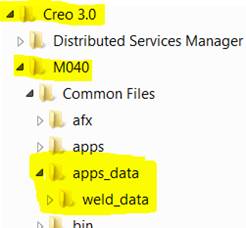
 

Also, select "Runner" under the Mold & Cast menu and the dialog box opens, but when I click on "round trapezoid" for shape - no dialog opens... I do however see a click flash in the upper left corner of the screen that says "Menu Manager". I've tried a simple round runner and I am able to put in the diameter, but after I sketch the profile it never shows (not even in a preview).

Is something not properly installed? And if so, how can I resolve?

Thank you in advance!

Brandon



Best answer by Mahesh_Sharma

Brandon,

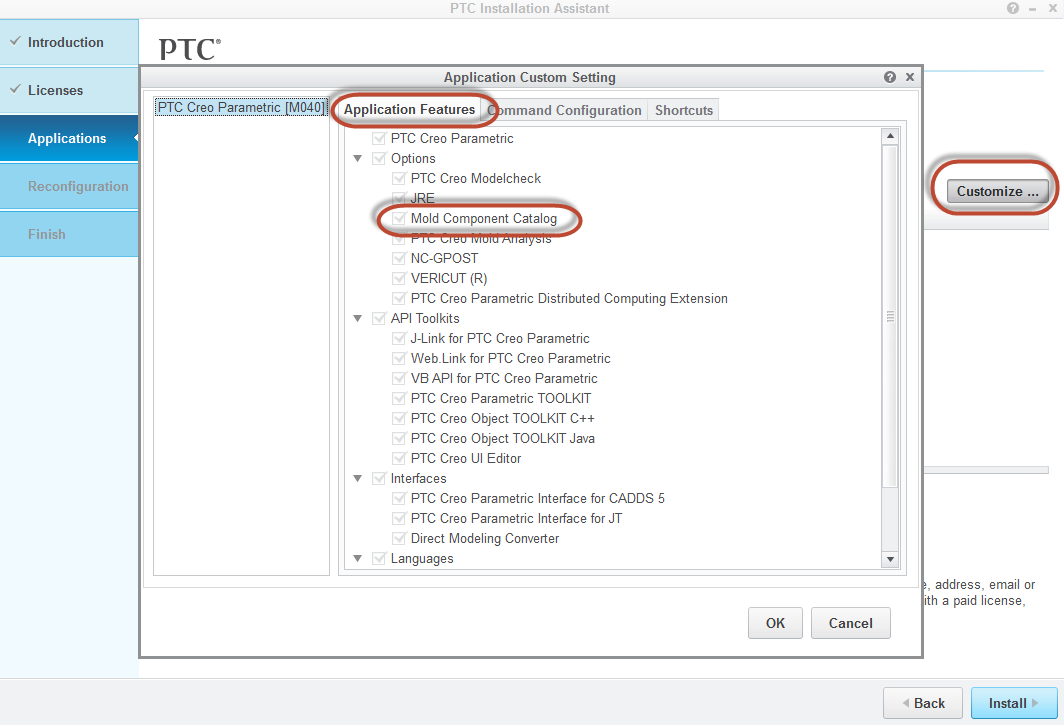
This is due to missing "Mold Component catalog" in your installation.

Reinstall Creo 3.0 and make sure you are checking "Mold Component Catalog" available under Customize > Application features to be installed.

Mold.png

3 replies

Mahesh_Sharma
22-Sapphire I
July 15, 2015

Brandon,

This is due to missing "Mold Component catalog" in your installation.

Reinstall Creo 3.0 and make sure you are checking "Mold Component Catalog" available under Customize > Application features to be installed.

Mold.png

1-Visitor
March 25, 2018

Problem solved.


Thanks for your help.

Mahesh_Sharma
22-Sapphire I
August 5, 2015

Brandon,

Let me know if previous answer help you.