
13-Aquamarine
December 21, 2022
Solved

Creo NC work center relation parameters

  • December 21, 2022
  • 5 replies
  • 14290 views

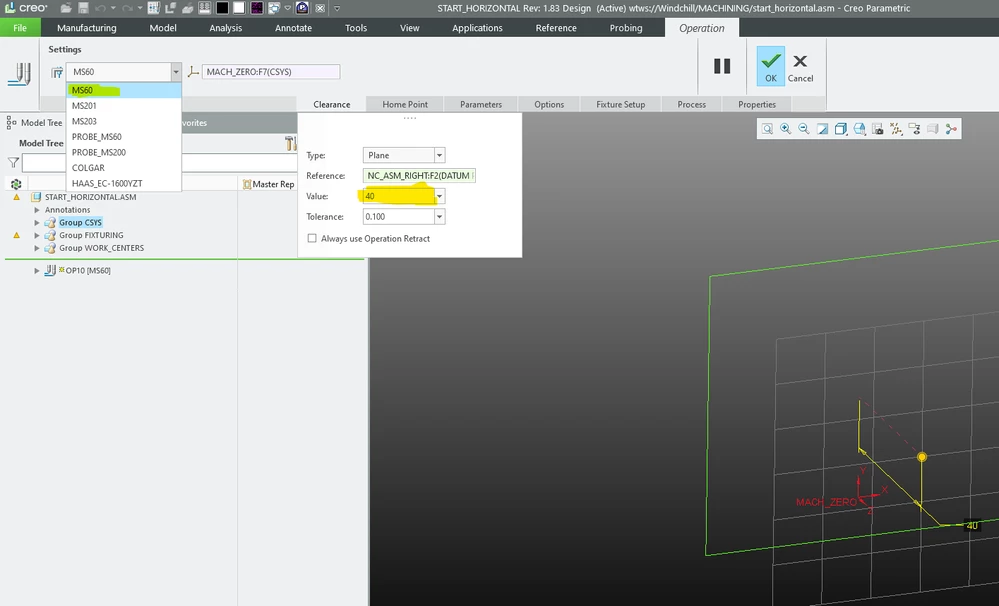
For whatever reason, Creo does not offer the ability to set a default clearance distance per machine.  I do not always remember all the travels on our machines and would like to set default clearance values to solve that issue.

I basically want to set a relation that states:
IF work cell = "insert machine name"

clearance = XX.XX

However to do this, I need to know the parameter names to pull for the work center and the clearance, and I do not know them.  Does anyone know what those parameters are, or know a better way to do this?
 

Screenshot.png

Best answer by hheinze

This is the answer to your question directly from PTC.
Answer:

Resolution
  • Not part of the Creo Parametric functionality
    • There is no operation parameter with the name of a Workcell used


https://www.ptc.com/en/support/article/CS133428?source=search&source=copyurl

5 replies

13-Aquamarine
December 21, 2022

I do not know of a way to reference a feature name in a relation.

Do you want the retract plane location (dimensional value) to change based upon the active workcell?

or

Do you want the default NC Sequence parameter CLEAR_DIST to be adjusted based upon active workcell?

You might consider a workflow where you have a different startpart for each machine with this set the way you want it, you would select the machine (startpart) for each job prior to programming.

-Bryant-

nlehman13-AquamarineAuthor
13-Aquamarine
December 21, 2022

Hey Bryan,
Yes, I am wanting to have the retract plane dimension change based on the selected workcell. 

I am not sure if I know exactly what a start part is.

13-Aquamarine
December 21, 2022

You can set your config.pro to look at a specific directory you setup to contain “startparts” using option mfg_start_model_dir – this directory could have multiple manufacturing files (perhaps one for each machine or machine type) and you would select which one to use when you create a new manufacturing file. Config option template_mfgnc will allow you to select which manufacturing file will be your default.

I find startparts to be very powerful, I choose this workflow to address the differences between machine tools, each startpart can contain some or all of the following:

Coordinate system, datum planes, points Named views Workcells With active SITE files Post processor # defined Operations With predefined retract plane Geometry: Surfaces, copy geom, publish geom Cutting tools loaded into workcell – could align with shop standardized tooling Workpiece NC Sequences Which can be copied/pasted quickly and could contain custom relations/parameters Associated drawing files – to generate setup sheets Annotation elements – for reference Drill tap chart, etc. Fixture representations

upload_-aW1hZ2UwMDIucG5n-8438854153239370802..png

11-Garnet
January 19, 2023

It would be a great help for anybody in every situation to have a list of ALL parameters in Creo NC.
I would love to have access to the sequence number but how do I manage this? What is the name of the parameter?

In your case maybe it helps you because then it is set as a standard or you select which set of the setups you use.

clearance.jpg

13-Aquamarine
January 19, 2023

Do you mean a list of all sequence level parameters? Attached is an excel list I compiled by outputting SITE files for each type workcell and combining.

11-Garnet
January 20, 2023

Thank you for that list and your quick response!
The first paragraph I wrote was concerning my problem when outputting CL_Data,
I have no idea where to get the param that gives me the STEP NO'# for each step.
I just get the Name, not the Step Number.


The second paragraph with the picture I made, addresses the question of the threadstarter.


Now the list you made is about the parameters for the machining/process,for creating that step and the calculation of the path.
What I look for, is laying "above" that parameter of the step, it is the naming and output of the cl_file. I can access very much through the Process Manager, but also there I am searching and searching for an answer, Please have a look at my two screenshots concerning this problem.


Maybe this forum helps, but there were others that asked and never got an answer to this..
Like in this thread: Parameter Sequence Number 
It is old and locked, but also dewscribes my problem pretty well.

Right now I use a workaround and manually put in the "_1" and so on, so the name is taken from the project. But even this equation is not saved as a parameter when I save that for another project. Equations are not handed over - another thing I have not found out.

Another thing is, when I make a documentation, the sequence number is inserted. So somehow this is sure accessible, but it is not documented.
Ot there is a .pro parameter, that gives the NCL Naming a sequence number right from the start. But I want to give the sequence  the same name and not i.e. for sequence number 1: "Schruppen_VS_D32".
I want the name to be OS_1842_NC_01 or 01_OS_1842_NC.

Look at the third pic, it is from the report that is generated.


Pic1

grafik.png

Pic2

Thing2.jpg


Pic3

thing3.jpg

11-Garnet
March 6, 2023

When I check the box "Always use Operation Retract" it is not even forcing any single step to retract to that operation Value.
So not even this is working for me (Still working with Creo 3 and being happy with this, for in newer versions are only new gimmicks but not really fixes implemented).

And I do not know the value either (it could be named "PRO_E_RETR_SURF_VALUE" but is not working..) and have to manually change the retract value for every step.

A workaround would  be, that we export the steps that shall have a different retract value with the process manager

hheinze_0-1678117528412.png,


change the "PRO_E_RETR_SURF_VALUE" in an xml editor like notepad++,

hheinze_1-1678117559211.png


and load this again with the process manager into the new project with the different machine.

here int the process managerhheinze_2-1678117760248.pngor
here, in the maching tab:

hheinze_4-1678117817578.png


P.S.: i guess I am understanding the "Always use Operation Retract" wrong.
Sorry, maybe it helps in one or an other way


11-Garnet
March 6, 2023

ok, different approach:
Use the normal parameters.

create clearance as a parameter.

hheinze_8-1678119474975.png

Write this into the field:

hheinze_9-1678119506965.png


If this works also for you, then you can do something like, because you said you have not all values in your head, do something like this:
If You have machine1 clearance=40

machine2 clearance=50,


then you write inside the field clearanceMach1

and if it is the second machine clearanceMach2 and so on.


The Values are set in the parameter field

clearanceMach1=40
clearanceMach2=50

nlehman13-AquamarineAuthor
13-Aquamarine
March 10, 2023

Yes, this does work, but what I was wanting to know is the name of the parameter for the work center, so I could write a relation that selects the clearance for me.  Something like this.  The "mfg_oper_workcell_name" works as a parameter for the work center in drawings but doesn't seem to work in the machining model.

IF mfg_oper_workcell_name == "Haas"
clearance= 40.00
ELSE

ENDIF

hheinze11-GarnetAnswer
11-Garnet
October 23, 2024

This is the answer to your question directly from PTC.
Answer:

Resolution
  • Not part of the Creo Parametric functionality
    • There is no operation parameter with the name of a Workcell used


https://www.ptc.com/en/support/article/CS133428?source=search&source=copyurl