
5-Regular Member
October 15, 2026
Question

Exclude CSYS layer in sheet metal flat pattern export DXF

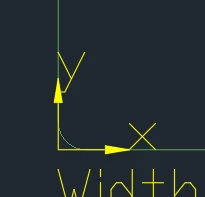
Currently exported sheet metal flat pattern DXF contain a layer CSYS with XY arrows.

This layer is not needed and could confuse the laser cutter system.

But there’s no option to remove the layer?

I’ve tried mapping it to BLANK or “”, but it’s still included.
 

1 reply

tbraxton
22-Sapphire II
October 15, 2026

Creo 13 direct export from part mode?

 According to the documentation for the functionality of the direct export of a flat pattern that layer is included as part of the export protocol. The UI options do not appear to offer any option to manipulate the inclusion of these layers.  You can try using a 2D drawing of the flat pattern and export from the drawing which I don’t think includes these layers by default.

https://support.ptc.com/help/creo/creo_pma/r13/usascii/index.html#page/sheetmetal/sheetmetaldesign/exporting_flat_patterns_to_dxf_and_dwg_files.html


Translate