
13-Aquamarine
February 17, 2018
Solved

How to remove M14 from GPOST Option file output?

  • February 17, 2018
  • 1 reply
  • 4859 views

I'm trying to perfect a GPOST options file so no further editing is required before running it.  The spindle on my Mill is not subject to CNC control and the controller knows it - doesn't recognize M14.  I can't figure out how to edit this out using Options File Generator.  I would also prefer not to have a G28 at the end of the file either. I had thought that removing it from the end processing would get rid of it, but alas....

.


Also, since I'm the only one using this system, is there anything wrong with changing read/write permissions in the gpost folder so I don't have to be administrator to modify them?
 

Best answer by TexasEddie

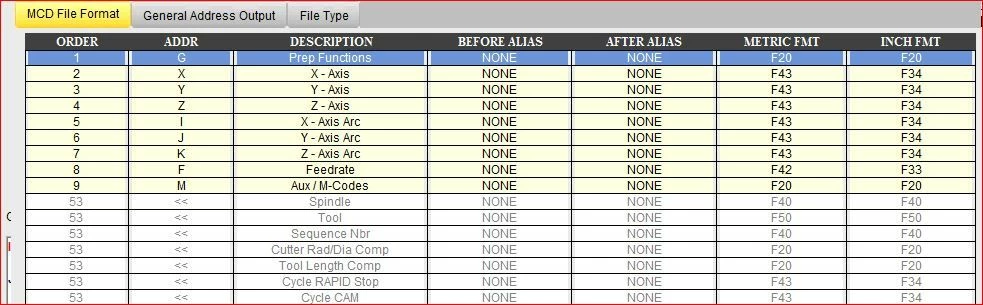
There are half a dozen ways to accomplish this. One simple way is to just eliminate the Spindle address from the MCD file. I actually have a mill that does not have CNC control of the spindle. As you see in the pic below, I just eliminate the spindle address. This is a homemade router that only uses one tool so there is no tool either.Capture2.JPG


1 reply

1-Visitor
February 19, 2018

There are half a dozen ways to accomplish this. One simple way is to just eliminate the Spindle address from the MCD file. I actually have a mill that does not have CNC control of the spindle. As you see in the pic below, I just eliminate the spindle address. This is a homemade router that only uses one tool so there is no tool either.Capture2.JPG


13-Aquamarine
February 19, 2018

Thanks much T.Eddie.  I'm running both a 6040 router and a Sherline Mill.  I like to leave the tool in because when i fire up, the controller asks me to load the tool and waits for me to hit an enter.  This is my last chance to avoid one of the dumber  mistakes.  

13-Aquamarine
February 22, 2018

I was wrong, this isn't quite solved yet, but maybe I was clumsy with the question.  The Post Options File I'm using emits an M13 or and M14 following an M6,  Taking the spindle code (S) out didn't change this.  My machine doesn't recognize M13 or M14 and it doesn't seem at all obvious how i could change that.  What it does recognize is M3 and M4 which are start spindle clockwise or Counterclockwise. This seems to be same thing the M13 and M14 are doing.  So the question should have been, where in Options File Generator can I find this function and change the output from M13 to M3 and so forth?