4-Participant
May 3, 2023
Question

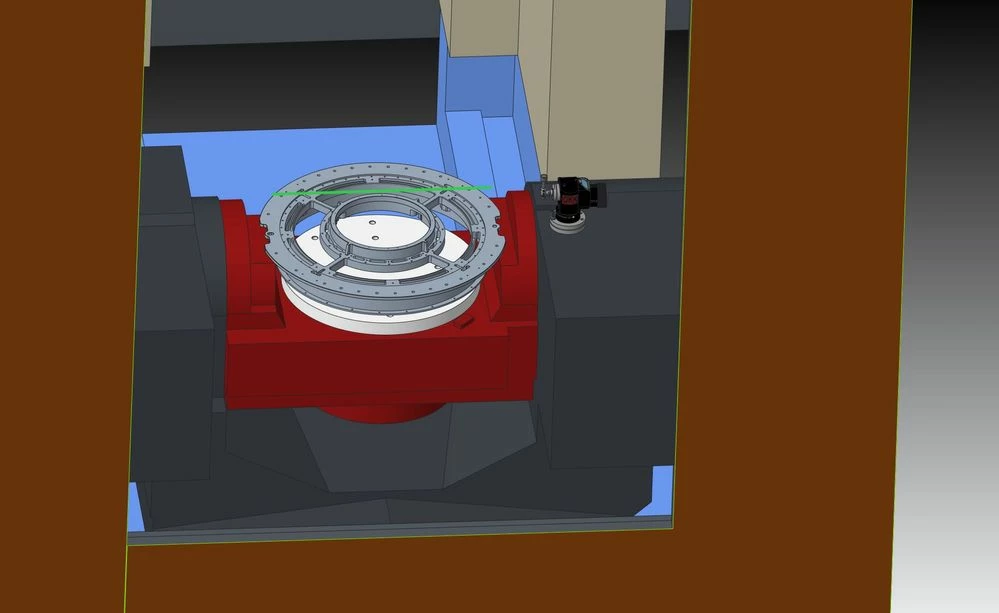
I have OKK 5 axis Machine with limited y axis travel CREO 9.03

  • May 3, 2023
  • 1 reply
  • 1630 views

As you can see the green line is Y+ axis limit .

How do I turn all 3 axis XYZ moves into X rotary Z moves?
OKK-TRAVEL-ISSUE.JPG

1 reply

14-Alexandrite
May 8, 2023

I don't know of a way to do exactly what you are interested in doing- that is, have the post-processor turn all xyz positions into axis rotations. Note that the Creo CL file output  is agnostic to the type of machine being used, so any limit  adjustment must be made in the gpost post-processor.


A way to avoid manual programming to eliminate the dead zone might be to adjust the post as the following pictures indicate. This feature appears to try to reposition the axis to enable the part to come into machine xyz limits. (Note, I have not used this feature, so I am merely guessing). The gpost creators might offer a better, or perhaps custom solution:  Austin NC Inc.
