7-Bedrock
October 27, 2022
Solved

Mill Volume and Mill Window grayed out since Creo 8

  • October 27, 2022
  • 2 replies
  • 4165 views

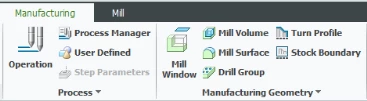
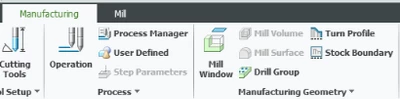
Has any noticed that you now have to have a work piece in order to turn on the Mill Volume and Mill Window options? This was never an issue with prior versions of Creo up to 7.0.9.0 All that was required in the past  was to have a reference model.  Where is the logic in forcing a work piece to be defined just to machine a surface or text on a surface. I could not find any config,pro options to reset this back.
 

dbrainsky2_0-1666895679227.png

Creo 8 and 9 


dbrainsky2_1-1666895974301.png

Creo 7


Best answer by MartinHanak

Hi,

I guess it is licensing problem. Compare parametric.psf files from Creo 8+9 with Creo 7.

Look at ENV=CREOPMA_FEATURE_NAME=... row.

2 replies

24-Ruby III
October 28, 2022

Hi,

I guess it is licensing problem. Compare parametric.psf files from Creo 8+9 with Creo 7.

Look at ENV=CREOPMA_FEATURE_NAME=... row.

Mahesh_Sharma
22-Sapphire I
October 28, 2022

Hi @dbrainsky-2 


It may happen when there is o reference model and the component assembled as part. Assembling the component as Reference Model in manufacturing assembly should fix this. 


Mahesh_Sharma_0-1666960160036.png


I hope this will help. 


Thanks. 

7-Bedrock
October 28, 2022
Thanks for the response.
 
It is very odd as I opened up the same assembly file on another computer and the problem was still there.
So I started a new mfg assembly on both computers and the problem is not there.
 
Nothing has changed. I have attached the problem mfg assembly for you to open on your system.
The part model was assembled using the default reference model.
 
Maybe you can find out what caused the issue in this assembly.
 
Best Regards
 
Dave
 
**************************
* David Brainsky
* Certified PTC Instructor
* Chula Vista, Ca. 91910

**************************
 
 
Mahesh_Sharma
22-Sapphire I
October 28, 2022

Hi @dbrainsky-2 


Seems you missed to attach the file.


Thanks