
12-Amethyst
May 29, 2022
Question

Moduleworks in Creo 9 -- Random large circles

  • May 29, 2022
  • 1 reply
  • 924 views

Has anyone seen this or have a suggestion for fixing it?


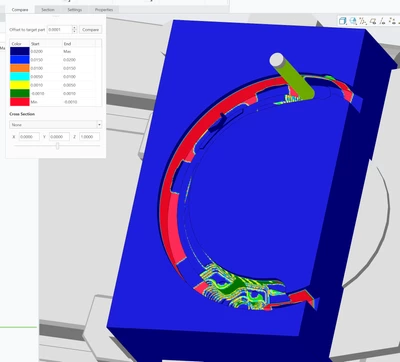
When I simulate a cut in moduleworks on Creo 9, it sometimes creates a random large circle that, of course, gouges the part.  Path simulation in Creo shows no such circle.  And when I run the part in real life, there are no problems.  But it really messes up my machining simulations.  I've had this on a couple of parts now.  On the part in the picture below, the red represents a gouge.  
 

EBBTIDE_0-1653806279685.png


I tried reducing the "interpolation tolerance" as well as the "collision tolerance", but neither eliminates the circle.


1 reply

24-Ruby III
May 31, 2022

@Daniel_E wrote:

Has anyone seen this or have a suggestion for fixing it?


When I simulate a cut in moduleworks on Creo 9, it sometimes creates a random large circle that, of course, gouges the part.  Path simulation in Creo shows no such circle.  And when I run the part in real life, there are no problems.  But it really messes up my machining simulations.  I've had this on a couple of parts now.  On the part in the picture below, the red represents a gouge.  


EBBTIDE_0-1653806279685.png


I tried reducing the "interpolation tolerance" as well as the "collision tolerance", but neither eliminates the circle.


Hi,

please report the problem to PTC Support.