

PocketNC PostProcessor
Hi everyone! first post here.
Recently we got a PocketNC V2-50 in our warehouse and I'm trying to set up a PostProcessor for it.
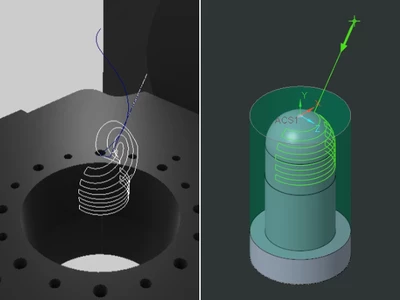
I'm almost there, but for some reason when the tool is moving around the spheric surface, it is not exporting the G-Code as it should be.
To me, it looks like the Post-Processor is trying to get from the beginning of one of the dome paths to the end of it but instead of going from the point, let say, M to point N as it should, it is getting to N from behind, so it's trying to calculate a smooth curve to get there, resulting in a wrong trajectory.
(Image below)
The cylindrical section is "fine", and I quote it because the whole program is running with the pocket NC is executing the code with the A table rotated 180º, which doesn't make any sense unless there's a setting that I'm missing in the Option File Generator (which is where I've been trying to get it done)
The PostProcessor I'm using as a reference is the UNCX01.P37, which is one of the Creo Library PostProcessors available. Attached to this post is a Zip File with my Assembly files, PostProcessor, NCL (Cutting Location file), NGC (G-Code file)
Thanks for your help!