12-Amethyst
November 11, 2022
Solved

Problem with G41 cutter compensation in a volume milling

  • November 11, 2022
  • 1 reply
  • 1827 views

Hello,


On my part, I use the volume milling function to create a slot diameter 4.2mm at the bottom of a side pocket in my part. For that I use an end mill diameter 4 and it works well.
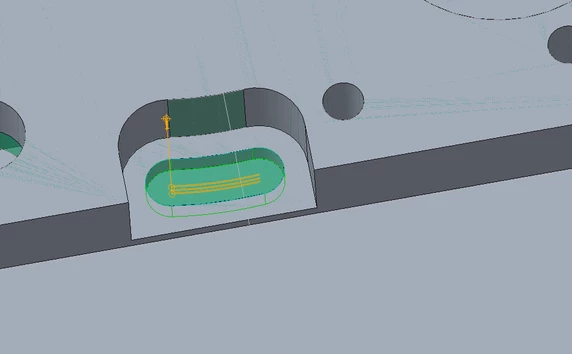
 

creo2.png


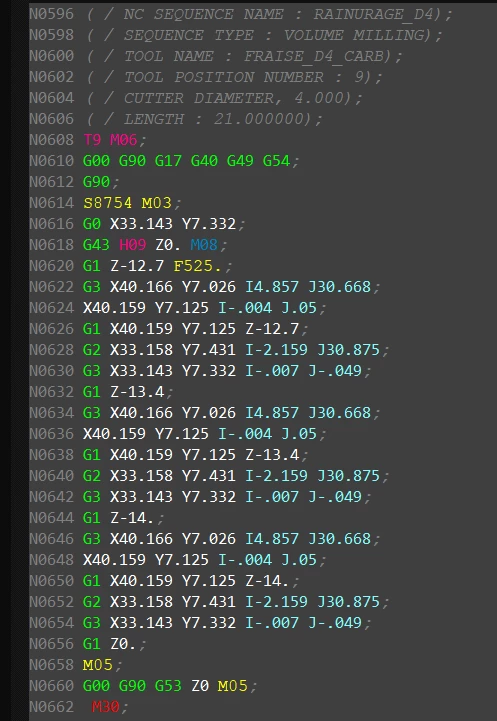
But when I try to use the cutter compensation (G41), nothing changes in the Gcode file.
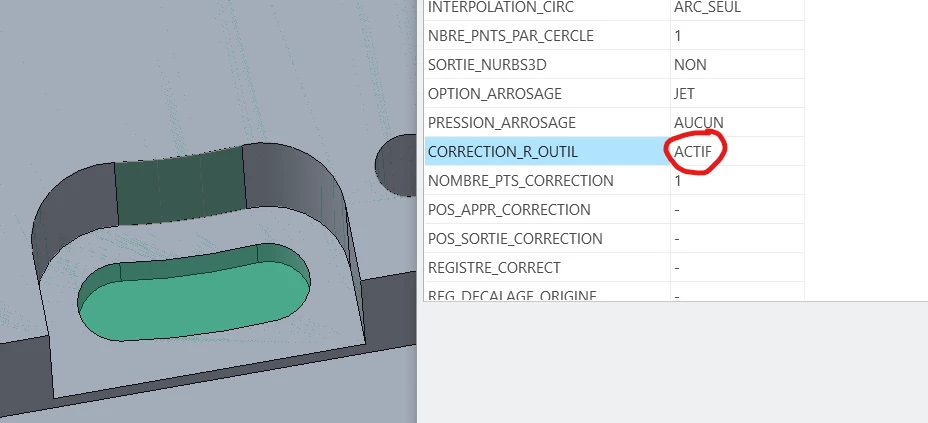
 

creo 3.png

creo 4.png

I have other sequences such as profile milling and the G41 is correctly converted into the GCode.

It never works with volume milling?


Does someone have an idea?


Thanks in advance

Best answer by KenFarley

From what I can find it seems that the volume milling does not use cutter compensation. The discussions I've seen seem to indicated that people use volume milling to rough out the pocket, then a second toolpath to finish the walls with cutter compensation. For example, see this discussion:


Volume Cutter Comp Discussion 


1 reply

KenFarley21-Topaz IIAnswer
21-Topaz II
November 11, 2022

From what I can find it seems that the volume milling does not use cutter compensation. The discussions I've seen seem to indicated that people use volume milling to rough out the pocket, then a second toolpath to finish the walls with cutter compensation. For example, see this discussion:


Volume Cutter Comp Discussion 


RJ_FR12-AmethystAuthor
12-Amethyst
November 12, 2022

Ok, thanks for the answer.