10-Marble
June 17, 2023
Question

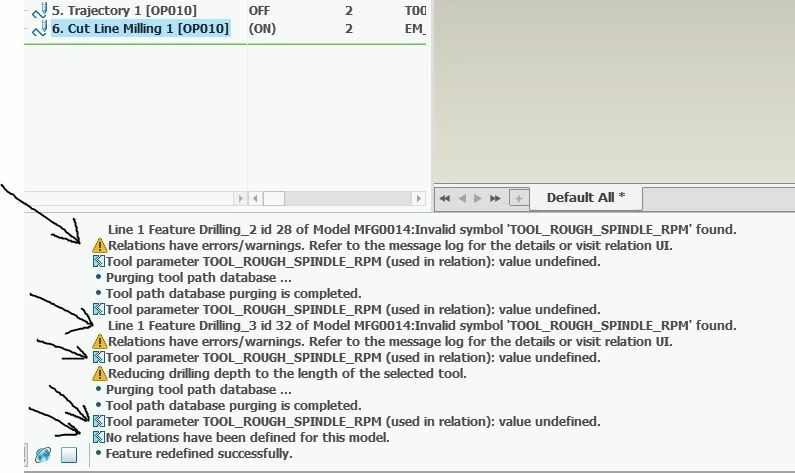
Remove error: Tool parameter TOOL_ROUGH_SPINDLE_RPM (used in relation): value undefined.

  • June 17, 2023
  • 2 replies
  • 1726 views

How do I remove the errors Tool parameter TOOL_ROUGH_SPINDLE_RPM (used in relation): value undefined. and Tool parameter TOOL_ROUGH_AXIAL_DEPTH (used in relation): value undefined.


I already do the following...

1. In the Tool Manager I add spindle speed and feed and radial and radial depth.

2. In the parameters I remove any relations with these variables.
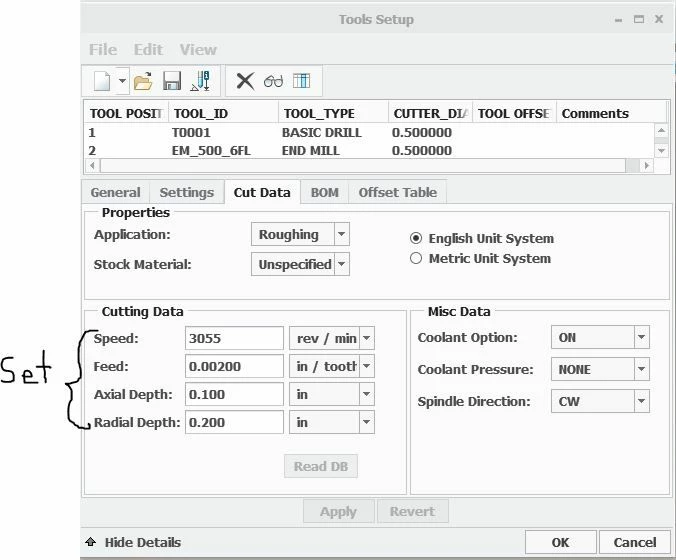
 

parameters.JPG


errors.JPG


2 replies

14-Alexandrite
June 22, 2023

I've taken a couple screen shots of some of my dialog box  travels. I've been wanting to understand machining parameters better. Some things I learned:

  • the message log has more details than the footer messages. Importantly, the feature id of the offending sequence is given.
  • the "d=" button shown in the screen shot shows the relations defined in the sequence.
  • the "show tool" menu item in the screen shot shows the currently defined tool parameters.
  • "TOOL_ROUGH_SPINDLE_RPM" et. al, seem to be defined by Creo after it's used in a relation from data provided from the tool rough and finish parameters.
  • looking at the xml file of the tool definition in a text editor after saving provides extra clues.


13-Aquamarine
April 5, 2024

Check if cutting data for the material of the stock prt is defined, if not this errors will occur.