
12-Amethyst
July 31, 2024
Solved

Turn off the spindle between each sequences

  • July 31, 2024
  • 1 reply
  • 2415 views

Hello,


I try to find a way to desactivate the spindle (or set it to 0) between two sequences with the same tool.

Example between 2 engraving sequences at the end of the first, spindle Z return to a safe plan, rapid  move to the second sketch and engrave but all with the spindle at the same speed.


For the moment I tested with inserting CL data but i think it's not very clean and risky.
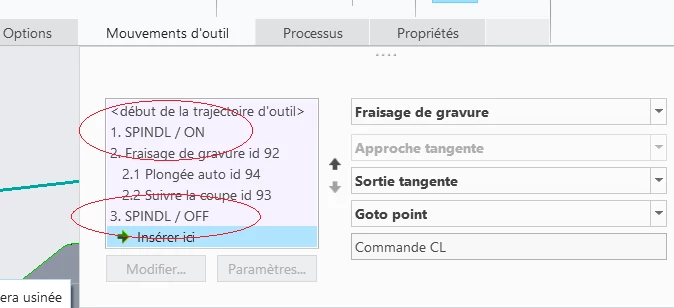
2024-07-31 08_10_58-.png


Is there a more professional method ?


Thanks in advance.

Best answer by RJ_FR

I tested several solutions thanks to your suggestions. The most effective is to insert CL command in sequence. On the other hand I agree it is one of the most dangerous at the risk of forgetting to modify other parameters.

But it is only for one specific case between 2 sequences. A solution to avoid forgetting parameters that I am going to use will be to define a machining method .xml and reuse it for each case. It save the "manually add" CL commands fot the sequence.


Thanks for the help.

1 reply

21-Topaz II
July 31, 2024

I guess it would depend on exactly what you want to do.

Are you wanting to

(a) Execute a sequence

(b) Stop the spindle

(c) Move to the next sequence start position

(d) Start the spindle

(e) Execute the sequence

...

If I had to do this I would likely do it by adding CL commands to the end of one sequence and the beginning of the next sequence.

You have to remember to turn off everything that should, like coolant, etc. I'll use something like this often if I'm running a sequence that I need to stop and check. For example, to make sure I've engraved to a sufficient depth.

The possible trouble with this approach is forgetting something, like turning the spindle back on, if you edit the sequences in the future. Or forgetting to turn the coolant back on.

Another approach is to use an auxiliary sequence, an old style type of sequence that you need to activate via some config.pro editing:

https://community.ptc.com/t5/Manufacturing-CAM/To-Create-an-Auxiliary-NC-Sequence-in-Creo-7-0/m-p/687177#M4682 

This type of sequence was very helpful in the past. You can use it to group together the things you want to do in a nice single sequence. Something like Turn off spindle -> Move to start point of next sequence -> turn on spindle. You can put an optional stop in there for checking on things, a hard stop if you need to add clamps for the next sequence, etc.

I always preferred the auxiliary sequence because it is a sequence and shows up in the model tree. I don't have to remember that I've got CL data insertions hidden within my sequences.

RJ_FR12-AmethystAuthor
12-Amethyst
July 31, 2024

Ok thanks, i add the option, but i don't find how to turn off spindle. I try with an OPSTOP (modify parameters of the Auxiliary sequence), it works, the code is convert in M05 in my program but not with the spindle...

21-Topaz II
July 31, 2024

If you add an auxiliar sequence, you can then use the "customize" (I'm sorry I don't know the French) to add CL commands, GOTO points, etc. It would be like you had in your first post, with SPINDL/ OFF before and spindle off after your engraving.

It's a way to have all these things you could add to the beginning or end of sequences but put them in a self-contained sequence. The difficult thing for what you want to do is to move the tool from the end of one sequence to the beginning of the next one. You might have to define a datum point to use as a GOTO point, or you can input X, Y, and Z distances to move, or whatever you can come up with.