

Volume milling, how to set entry angle or lead-in
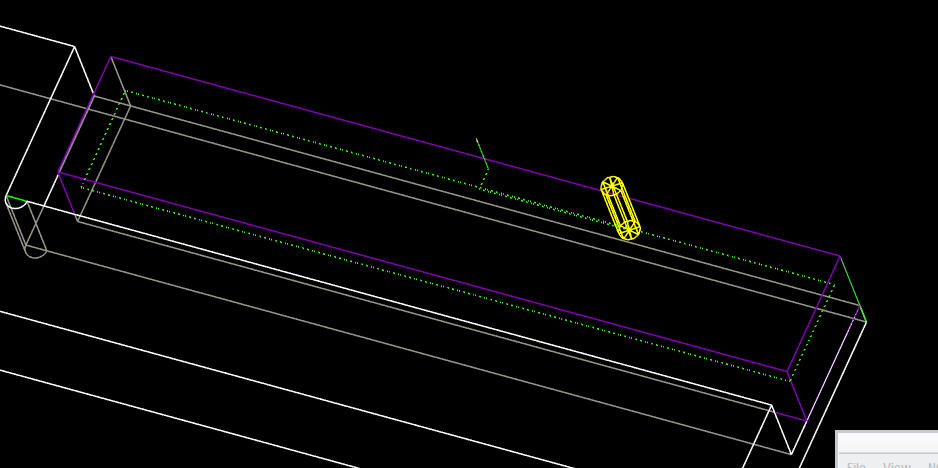
I have a simple rectangular volume, an island of material, that is to be completely machined away.
I want to do it by doing a spiral path, starting on the outside, deep DOC, small stepover.
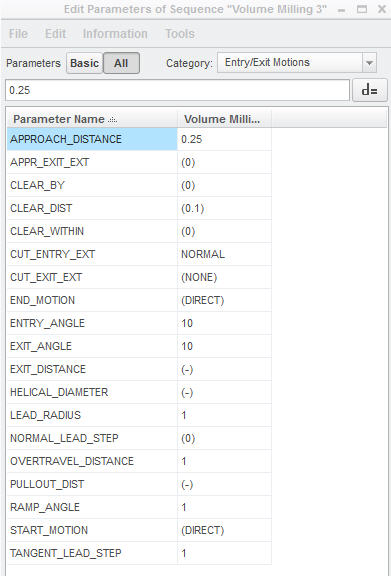
That is working fine, however I can't get it to 'lead-in' or ramp from a top-view. Setting CUT_ENTRY_EXT to RAMP ramps during the initial plunge, which is not what I'm going for. I want it to fully plunge in Z, then ramp into the material in X/Y (top) plane.
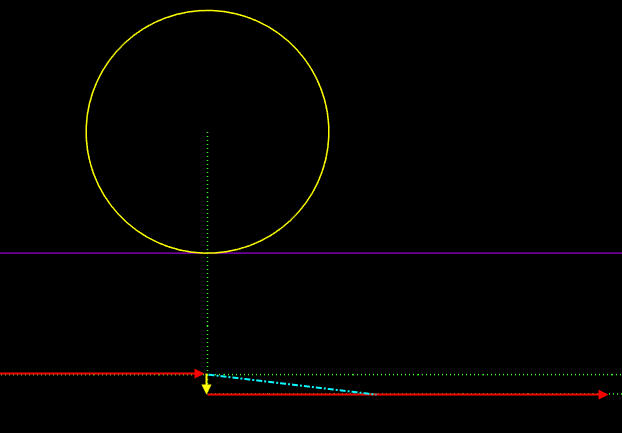
In second image below, the actual path it is generating is the red and yellow arrows. yellow arrow is how cutter is moving straight into the material (perpendicular to wall). I want a 'ramp/lead' like the blue dotted line. yellow circle is the initial plunge outside the volume.
I've tried all the options in CUT_ENTRY_EXT to no avail...
Any ideas? Thank you for looking
Creo3.0 M040
This thread is inactive and closed by the PTC Community Management Team. If you would like to provide a reply and re-open this thread, please notify the moderator and reference the thread. You may also use "Start a topic" button to ask a new question. Please be sure to include what version of the PTC product you are using so another community member knowledgeable about your version may be able to assist.